You wrote a script. It’s going to read a million rows, do something with side effects for each one, and it will take hours. It won’t run on your laptop. It’ll run on a box you reach through a remote shell, and that shell will drop at the worst possible moment. Halfway through, someone will ping you asking to slow down because a downstream service is sweating. And when it’s all done, someone (probably future you) will ask: “how do we know every single row was handled?”
I recently spent a few days running exactly this kind of job. A handful of boring habits made the difference between a stressful few days and a calm one. None of them are new or clever, and all of them are cheap. Let’s go through them.
TLDR; Verify every file you move with a checksum. Write a receipt for every row you process. Make “run it again” the same thing as “resume”. Steer the script with plain files instead of killing it. Write logs for humans. Archive everything, then verify the archive.
The big picture 🤓
Here’s the life of one chunk of work, from your laptop to the remote box and back:
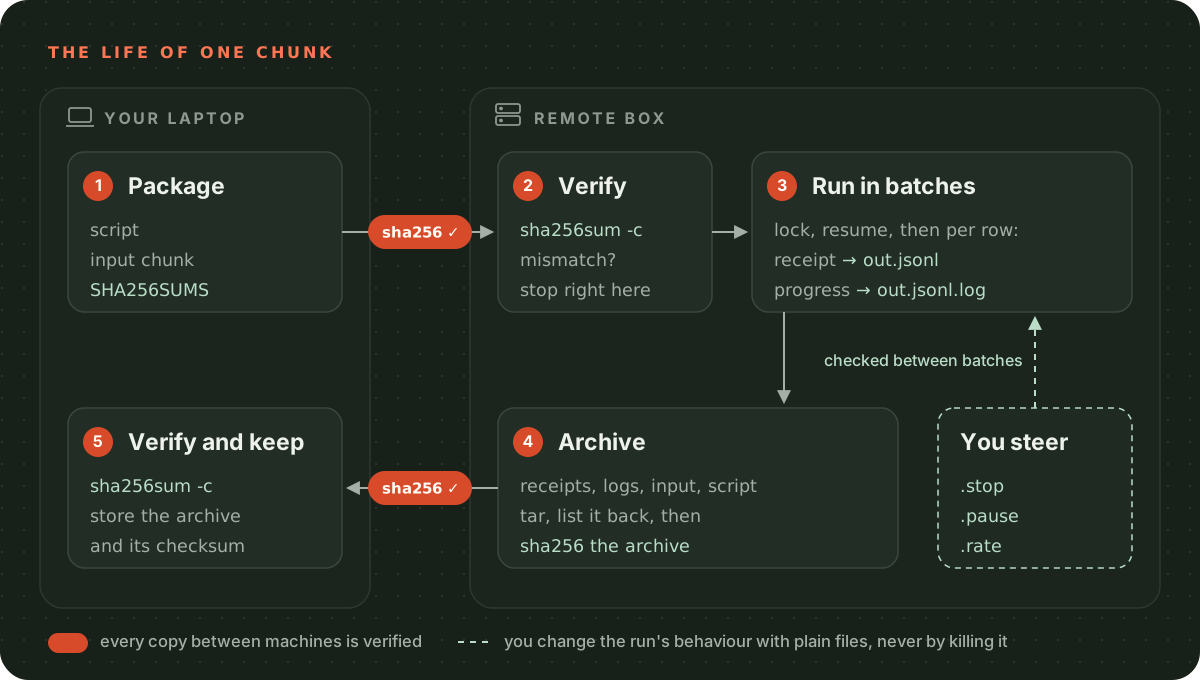
Every arrow that crosses a boundary gets a checksum. Everything the script does leaves a trace in a file. Everything you need to steer it is a file too. That’s the whole philosophy, the rest is details.
1. Trust nothing you copied: verify checksums
Files get truncated. Uploads silently fail halfway. You copy v2 of the script but your console still has v1 loaded. You upload the input file for chunk 3 while you think you’re running chunk 4. None of these throw an error, they just give you wrong results hours later.
The fix is boring: compute a SHA-256 on the sending side, compute it again on the receiving side, and compare. Do it for everything that moves: the script, the input files and the result archives coming back.
The lowest effort way is a manifest file that travels with the files:
# On your laptop
shasum -a 256 runner.rb chunk_0001.jsonl.gz > SHA256SUMS
scp runner.rb chunk_0001.jsonl.gz SHA256SUMS remote:/work/job/

# On the remote box
cd /work/job && sha256sum -c SHA256SUMS
# runner.rb: OK
# chunk_0001.jsonl.gz: OK
shasum -a 256is the macOS spelling,sha256sumis the Linux one. They produce the same output format, so a manifest made by one can be checked by the other.
When the script itself loads the input, have it verify the checksum before it touches a single row. And have it print a short fingerprint of its own source (or binary) when it starts. If you’re working in a long-lived console where you reload code, that fingerprint is the only reliable way to know which version is actually running.
require "digest"

# Returns the SHA-256 of a file as a 64 character hex string.
#
# Digest::SHA256.file reads the file in small chunks and feeds each chunk to the hash.
# That matters for big inputs: a 20 GB file is hashed without ever being loaded into
# memory. File.read(path) would try to load all of it at once.
def sha256_of(path)
  Digest::SHA256.file(path).hexdigest
end

# Compares a file's hash with the one recorded on the sending side (your manifest or
# runbook). Call this BEFORE the script touches a single row: a truncated upload or the
# wrong chunk should stop the run here, not show up as wrong results hours later.
def verify!(path, expected)
  actual = sha256_of(path)

  # The happy path: the file is exactly what was sent. Carry on quietly.
  return if actual == expected

  # Fail loudly. abort prints the message to stderr and exits with status 1, so a
  # wrapper script or a human watching the terminal can't mistake this for success.
  # Show both hashes: the operator can see at a glance whether it's a typo in the
  # runbook or a genuinely different file.
  abort "checksum mismatch for #{path}: expected #{expected}, got #{actual}"
end

# Example: check the input given on the command line, e.g.
#   ruby script.rb chunk_0001.jsonl.gz 3f2a...e9
verify!(ARGV[0], ARGV[1])

# Print a short fingerprint of this script's own source. __FILE__ is the path of the
# file this line lives in. When the fingerprint shows up in the log, the log proves
# which version of the script actually ran, even in a console where code gets
# reloaded. The first 8 hex characters are plenty to tell versions apart.
puts "script #{sha256_of(__FILE__)[0, 8]}"
import hashlib
import sys


def sha256_of(path: str) -> str:
    """Return the file's SHA-256 as hex text, exactly what `shasum -a 256` prints."""
    digest = hashlib.sha256()
    # Open in binary mode ("rb"): we want the exact bytes on disk, with no text decoding
    # and no newline translation that could change the hash.
    with open(path, "rb") as f:
        # Read 1 MiB at a time (1 << 20 bytes) and feed each piece to the hash.
        # A multi-gigabyte input never has to fit in memory this way.
        # iter(read, b"") keeps calling read until it returns b"" (end of file).
        for chunk in iter(lambda: f.read(1 << 20), b""):
            digest.update(chunk)
    return digest.hexdigest()


def verify(path: str, expected: str) -> None:
    """Stop the script if the file is not byte for byte the one we meant to use."""
    actual = sha256_of(path)
    # `expected` is the hash recorded on the sending side, before the file was copied.
    # If the copy was truncated, or it's the wrong file, the two hashes won't match.
    if actual != expected:
        # sys.exit with a message prints it to stderr and exits with status 1.
        # Failing loudly here, before a single row is touched, is the whole point:
        # a wrong input discovered hours later costs far more than a refused start.
        sys.exit(f"checksum mismatch for {path}: expected {expected}, got {actual}")


# At the very top of the script, before any work: check the input against the hash
# you were given (python script.py <input> <expected sha256>).
verify(sys.argv[1], sys.argv[2])

# Print a short fingerprint of this script's own source. When you read the output
# later, it proves which version of the script actually ran.
print(f"script {sha256_of(__file__)[:8]}")
package main

import (
	"crypto/sha256"
	"encoding/hex"
	"fmt"
	"io"
	"log"
	"os"
)

// sha256Of returns the SHA-256 hash of a file as a hex string, the same text that
// `shasum -a 256` prints. We use it to prove the file we received is the file
// that was sent.
func sha256Of(path string) (string, error) {
	f, err := os.Open(path)
	if err != nil {
		return "", err
	}
	// defer runs f.Close() when the function returns, on every path, including errors.
	defer f.Close()

	// io.Copy feeds the file to the hasher in small chunks, one after the other.
	// So a 50 GB input never has to fit in memory: we stream it, we never load it whole.
	h := sha256.New()
	if _, err := io.Copy(h, f); err != nil {
		return "", err
	}
	return hex.EncodeToString(h.Sum(nil)), nil
}

// verify compares the file's hash with the hash recorded on the sending side
// (the machine that exported the data). A mismatch means the file was cut short or
// changed on the way, so we return an error instead of quietly processing bad input.
func verify(path, expected string) error {
	actual, err := sha256Of(path)
	if err != nil {
		return err
	}
	if actual != expected {
		return fmt.Errorf("checksum mismatch for %s: expected %s, got %s",
			path, expected, actual)
	}
	return nil
}

func main() {
	// Step 1: check the input BEFORE doing any work.
	// Failing loudly here is cheap; finding out after 3 hours of writes is not.
	// log.Fatal prints the error and exits with a non-zero status.
	if err := verify(os.Args[1], os.Args[2]); err != nil {
		log.Fatal(err)
	}

	// Step 2: fingerprint the script itself (the compiled binary that is running).
	// Printing it means the log proves exactly which version of the code ran.
	// The errors are ignored on purpose: the fingerprint is useful, but never worth
	// a crash.
	self, _ := os.Executable()
	fingerprint, _ := sha256Of(self)

	// %.8s prints at most the first 8 characters, and is safe even if the string is empty
	// (slicing with fingerprint[:8] would panic in that case).
	fmt.Printf("binary %.8s\n", fingerprint)
}
// Cargo.toml: sha2 = "0.10"
use sha2::{Digest, Sha256};
use std::{env, fs::File, io, process};

/// Returns the SHA-256 of a file as lowercase hex, the same text `sha256sum` prints.
fn sha256_of(path: &str) -> io::Result<String> {
    let mut file = File::open(path)?;
    let mut hasher = Sha256::new();
    // io::copy reads the file in small chunks and feeds each chunk to the hasher
    // (Sha256 implements io::Write). A 50 GB input never has to fit in memory.
    io::copy(&mut file, &mut hasher)?;
    // {:x} formats the digest bytes as lowercase hex.
    Ok(format!("{:x}", hasher.finalize()))
}

/// Compares the file against the hash recorded on the sending side, before the upload.
/// If they differ, the file was truncated or changed on the way, or it's the wrong file.
fn verify(path: &str, expected: &str) -> Result<(), String> {
    // The `?` stops here if the file can't be read. An unreadable file is a failure
    // too, so we turn the io::Error into a plain message and return it.
    let actual = sha256_of(path).map_err(|e| e.to_string())?;
    if actual != expected {
        return Err(format!(
            "checksum mismatch for {path}: expected {expected}, got {actual}"
        ));
    }
    Ok(())
}

fn main() {
    // Usage: script <input file> <expected sha256>
    let args: Vec<String> = env::args().collect();

    // Step 1: check the input BEFORE doing any work. A wrong file doesn't throw an
    // error on its own, it just gives wrong results hours later. So fail loudly now,
    // with a non-zero exit code that a shell script or a human can't miss.
    if let Err(e) = verify(&args[1], &args[2]) {
        eprintln!("{e}");
        process::exit(1);
    }

    // Step 2: fingerprint the program itself. Hashing our own compiled binary and
    // printing the start of the hash means the log proves which build ran.
    // Compare it with `sha256sum` of the binary you meant to upload.
    let me = env::current_exe().expect("own path");
    let fingerprint = sha256_of(me.to_str().expect("utf-8 path")).expect("own hash");
    // 8 hex characters are plenty to tell two builds apart in a log line.
    println!("binary {}", &fingerprint[..8]);
}
import { createHash } from "node:crypto";
import { createReadStream } from "node:fs";
import { fileURLToPath } from "node:url";

// Returns the SHA-256 of a file as a hex string: the same text that
// `shasum -a 256` (macOS) and `sha256sum` (Linux) print for it.
async function sha256Of(path: string): Promise<string> {
  const hash = createHash("sha256");

  // Read the file as a stream of small chunks (64 KiB each by default) and feed
  // them to the hash one at a time. Only one chunk is in memory at once, so this
  // works the same for a 2 KB script and a 50 GB input file.
  // `for await` is how you loop over a stream in modern Node.js.
  for await (const chunk of createReadStream(path)) {
    hash.update(chunk);
  }

  return hash.digest("hex");
}

// Throws if the file on disk is not the file we think it is.
// `expected` is the checksum you recorded on the sending side, before the copy.
async function verify(path: string, expected: string): Promise<void> {
  const actual = await sha256Of(path);
  if (actual !== expected) {
    // Fail loudly and show both values, so the operator can tell at a glance
    // whether it's a truncated upload or simply the wrong file.
    throw new Error(`checksum mismatch for ${path}: expected ${expected}, got ${actual}`);
  }
}

// Usage: node runner.ts <input file> <expected sha256>
// process.argv[0] is node itself and [1] is this script, so our arguments
// start at index 2.
const inputPath = process.argv[2];
const expectedSha256 = process.argv[3];

// Verify the input BEFORE touching a single row. A wrong or half-copied file is
// cheap to catch now and very expensive to discover after hours of work.
// If it throws, Node prints the error and exits with a non-zero code.
// (A top-level `await` works because this file is an ES module.)
await verify(inputPath, expectedSha256);

// Print a short fingerprint of this script's own source. When the log says
// "script 3f2a91c0", you can compare it with the checksum of the file you
// uploaded and know exactly which version ran.
// import.meta.url is this file's location as a file:// URL, and fileURLToPath
// turns it into a normal path.
const scriptPath = fileURLToPath(import.meta.url);
const fingerprint = (await sha256Of(scriptPath)).slice(0, 8);
console.log(`script ${fingerprint}`);
Write the expected checksums down somewhere you’ll find them again: next to the commands in your runbook is perfect. When the remote side prints true or OK, you move on. When it doesn’t, you’ve just saved yourself a few hours of confusion.
2. Keep a receipt for every row
This is the habit that everything else builds on. For every input row your script touches, it writes one line to an output file: which row, which record, what happened, and when.
{"row":1041,"key":"order-88123","outcome":"done","detail":"","at":"2026-11-06T09:14:03Z"}
{"row":1042,"key":"order-88124","outcome":"skipped","detail":"already processed","at":"2026-11-06T09:14:03Z"}
{"row":1043,"key":"order-88125","outcome":"failed","detail":"Timeout: upstream took 30s","at":"2026-11-06T09:14:04Z"}
I call this file the receipts file (you might know it as a reconciliation log). It gives you four things for free:
- An audit trail. When someone asks “what happened to order 88125?”, you
grepfor it. - A completeness check. The receipts file must have exactly as many lines as the input had rows.
wc -lis now a test. - A resume point. The highest row number in the file is where you stopped (more on this below).
- A retry list. Every
failedline is a row you need to process again, and nothing else.
A few rules make it reliable:
- One line per row, append only. Never rewrite or edit the file. JSON Lines or CSV both work, as long as one line is one row.
- Write the receipt right after the work, then flush to disk at the end of every batch. If the process dies, you lose at most one batch of receipts, never the whole file.
- Every row gets an outcome, including the boring ones.
skippedis information. A row with no receipt is a row you can’t account for. - Tolerate a torn last line. If the process is killed mid-write, the last line may be half a line. Readers should skip lines that don’t parse instead of crashing. The writer should check for it too: if the file doesn’t end with a newline, add one before appending. Otherwise the next receipt gets glued onto the broken fragment and you silently lose it. (That broken fragment now counts as an extra line in
wc -l, which is the honest answer: something did go wrong there.)
require "json"
# "time" adds Time#iso8601, used for the timestamp on every receipt.
require "time"

# The receipts file: one JSON object per line (JSON Lines), one line per input row.
#
# Because it's append only and has exactly one line per row, the same file is:
#   - an audit trail: grep for a key to see what happened to it and when
#   - a completeness check: `wc -l` must equal the number of input rows
#   - a resume point: the highest row number is where the last run got to
#   - a retry list: every "failed" line is a row to process again
class Receipts
  # Returns the highest row number already in the receipts file, or 0 if there is no
  # file yet. A rerun skips every row up to this number, which is what makes
  # "run the same command again" work as "resume".
  def self.last_row(path)
    # No receipts file means nothing has been processed yet: start from the top.
    return 0 unless File.exist?(path)

    last = 0
    # File.foreach reads one line at a time, so a receipts file with millions of
    # lines doesn't have to fit in memory.
    File.foreach(path) do |line|
      row = JSON.parse(line)["row"]
      # Take the maximum instead of trusting the last line, so the answer is right
      # even if lines are ever out of order.
      last = [last, row].max
    # A `rescue` directly inside a do...end block (Ruby 2.6+) covers only this line.
    # If the process was killed in the middle of writing, the last line can be half a
    # line that isn't valid JSON. Skip it instead of crashing: the row it described
    # was never confirmed, so it will simply be processed again.
    rescue JSON::ParserError
      next
    end
    last
  end

  def initialize(path)
    # Before opening, check whether the file ends in the middle of a line: that's the
    # torn line a crash can leave behind. File.size? returns nil for a missing or
    # empty file, so a fresh file is never "torn". We read just the last byte.
    torn = File.size?(path) && File.read(path, 1, File.size(path) - 1) != "\n"

    # "a" is append mode: every write goes to the end of the file. We never rewrite
    # or edit earlier receipts, they are evidence.
    @file = File.open(path, "a")

    # End the torn line first. Without this, the next receipt would be glued onto the
    # broken fragment, become unreadable too, and that row's receipt would be lost.
    @file.puts if torn
  end

  # Writes one receipt. Call it right after the work for a row is done, so the
  # receipt describes what actually happened.
  def write(row:, key:, outcome:, detail: "")
    receipt = {
      row: row,         # position in the input: drives resume and retries
      key: key,         # the record's own id: what you grep for in an audit
      outcome: outcome, # "done", "skipped" or "failed"
      detail: detail,   # the why, e.g. the error message of a failure
      # Always UTC, so receipts from boxes in different time zones line up.
      at: Time.now.utc.iso8601,
    }
    # puts adds the newline that makes this exactly one line.
    @file.puts(receipt.to_json)
  end

  # Called once per batch. This is the durability boundary: once it returns, the
  # batch's receipts survive a crash or even a power cut.
  def flush
    # flush moves Ruby's in-memory buffer into the operating system...
    @file.flush
    # ...but the OS may still hold it in its own cache for a while. fsync asks the OS
    # to write it to the disk and waits until it has. Flush alone isn't enough to
    # survive the machine going down.
    @file.fsync
  end

  def close
    @file.close
  end
end
import json
import os
from datetime import datetime, timezone


class Receipts:
    """An append-only JSON Lines file with exactly one line (one receipt) per input row.

    That one file is four tools at once: an audit trail (grep for a key), a completeness
    check (`wc -l` must equal the number of input rows), a resume point (the highest
    row) and a retry list (every "failed" line).
    """

    @staticmethod
    def last_row(path: str) -> int:
        """Highest row already written, so a rerun continues after it."""
        # No receipts file yet means nothing was processed: start from the beginning.
        if not os.path.exists(path):
            return 0
        last = 0
        with open(path, encoding="utf-8") as f:
            # Read line by line, so a big receipts file doesn't have to fit in memory.
            for line in f:
                try:
                    receipt = json.loads(line)
                except json.JSONDecodeError:
                    # If the process was killed in the middle of a write, the last line
                    # can be half a line. Skip what doesn't parse instead of crashing:
                    # that row has no complete receipt, so it simply gets done again.
                    continue
                # Take the maximum rather than "the last line", so the answer is right
                # even if a torn line is the last thing in the file.
                last = max(last, receipt["row"])
        return last

    def __init__(self, path: str):
        # Mode "a" (append): every write goes to the end of the file. We never rewrite
        # or edit old receipts, so an earlier run's evidence can't be damaged.
        self.file = open(path, "a", encoding="utf-8")

        # In append mode the position starts at the end, so tell() is the file size.
        # If the file is not empty, check that its last byte is a newline.
        if self.file.tell() > 0:
            with open(path, "rb") as f:
                f.seek(-1, os.SEEK_END)
                last_byte = f.read(1)
            if last_byte != b"\n":
                # A crash left a half-written last line. Without this newline, the next
                # receipt would be glued onto that broken line, would not parse either,
                # and that row would end up with no receipt at all.
                self.file.write("\n")

    def write(self, row: int, key: str, outcome: str, detail: str = "") -> None:
        # Timestamps in UTC: the remote box, your laptop and your teammates may all be
        # in different time zones, and UTC never jumps for daylight saving time.
        at = datetime.now(timezone.utc).isoformat(timespec="seconds")
        receipt = {"row": row, "key": key, "outcome": outcome, "detail": detail, "at": at}
        # One JSON object per line, ended by a newline. That's what makes it JSON Lines.
        self.file.write(json.dumps(receipt) + "\n")

    def flush(self) -> None:
        """Make the receipts written so far survive a crash. Called once per batch."""
        # flush() only moves Python's in-memory buffer into the operating system.
        # The OS can still hold that data in its own cache for a while.
        self.file.flush()
        # fsync() asks the OS to put it on the disk itself, so it survives a killed
        # process, a kernel crash or a power cut. This is the durability boundary:
        # if the box dies, we lose at most the current batch of receipts.
        os.fsync(self.file.fileno())

    def close(self) -> None:
        self.file.close()
// A Receipt is one line in the output file: what happened to one input row.
// The receipts file is JSON Lines (one JSON object per line, append-only), and that one
// file does four jobs:
//   - an audit trail: what happened to every row, and when;
//   - a completeness check: `wc -l` should equal the number of input rows;
//   - a resume point: the highest row in it is where a rerun continues;
//   - a retry list: the rows whose outcome is "failed".
//
// The `json:"..."` tags set the field names used in the JSON.
type Receipt struct {
	Row     int    `json:"row"`
	Key     string `json:"key"`
	Outcome string `json:"outcome"` // done, skipped or failed
	Detail  string `json:"detail"`
	At      string `json:"at"`
}

// Receipts appends receipts to the output file.
type Receipts struct {
	file *os.File
	enc  *json.Encoder
}

func OpenReceipts(path string) (*Receipts, error) {
	// O_APPEND: every write goes to the end, so old receipts are never overwritten.
	// O_CREATE: create the file on the first run.
	// O_RDWR (read and write) instead of write-only, because of the check below.
	// 0o600: only the owner can read the file, as it may hold customer data.
	f, err := os.OpenFile(path, os.O_CREATE|os.O_APPEND|os.O_RDWR, 0o600)
	if err != nil {
		return nil, err
	}

	// A crash in the middle of a write can leave a torn (half-written) last line.
	// If we appended straight after it, the next receipt would be glued onto the
	// broken line, that whole line would fail to parse, and the receipt would be lost.
	// So: if the file doesn't end with a newline, add one before we write anything.
	if info, err := f.Stat(); err == nil && info.Size() > 0 {
		lastByte := make([]byte, 1)
		_, err := f.ReadAt(lastByte, info.Size()-1)
		if err == nil && lastByte[0] != '\n' {
			f.WriteString("\n")
		}
	}
	return &Receipts{file: f, enc: json.NewEncoder(f)}, nil
}

func (r *Receipts) Write(rc Receipt) error {
	// Timestamps are in UTC so logs from machines in different time zones line up.
	rc.At = time.Now().UTC().Format(time.RFC3339)

	// Encode writes the JSON and adds the newline, so each receipt is exactly one line.
	return r.enc.Encode(rc)
}

// Flush makes the receipts durable. We call it once per batch: that is the durability
// boundary. After Flush returns, a crash or power cut can't lose that batch's receipts.
//
// Why Sync (fsync) and not just a flush? A write only hands the data to the operating
// system, which keeps it in memory and saves it to disk later. If the machine dies before
// that, the data is gone. Sync waits until the disk has really stored it.
// (Go's os.File has no buffer of its own, so there is nothing else to flush.)
func (r *Receipts) Flush() error { return r.file.Sync() }

func (r *Receipts) Close() error { return r.file.Close() }

// LastRow returns the highest row already written, so a rerun continues after it.
// If the file doesn't exist yet, this is the first run and we start from row 0.
func LastRow(path string) (int, error) {
	f, err := os.Open(path)
	if errors.Is(err, os.ErrNotExist) {
		return 0, nil
	}
	if err != nil {
		return 0, err
	}
	defer f.Close()

	// Read the file line by line, so a big receipts file never has to fit in memory.
	last := 0
	scanner := bufio.NewScanner(f)
	for scanner.Scan() {
		var rc Receipt
		if json.Unmarshal(scanner.Bytes(), &rc) != nil {
			// A crash can leave a half-written last line. It doesn't parse, so skip it.
			continue
		}
		// Take the maximum rather than the last line read: it is the safest resume point
		// even if lines are not in row order (for example after a retry).
		last = max(last, rc.Row)
	}
	return last, scanner.Err()
}
// Cargo.toml: serde = { version = "1", features = ["derive"] }, serde_json = "1",
//             chrono = "0.4"
use chrono::{SecondsFormat, Utc};
use serde::{Deserialize, Serialize};
use std::fs::{File, OpenOptions};
use std::io::{self, BufRead, BufReader, BufWriter, Read, Seek, SeekFrom, Write};

/// One receipt is one line of JSON for one input row, for example:
/// {"row":42,"key":"user-17","outcome":"done","detail":"","at":"2026-11-06T09:14:03Z"}
///
/// The receipts file is append-only JSON Lines, one line per row. That one plain
/// file does four jobs:
/// - an audit trail: what happened to each row, and when
/// - a completeness check: `wc -l` should equal the number of input rows
/// - a resume point: the highest row in it is where a rerun continues
/// - a retry list: the rows whose outcome is "failed"
///
/// derive(Serialize, Deserialize) lets serde turn this struct into JSON and back.
#[derive(Serialize, Deserialize)]
pub struct Receipt {
    pub row: u64,
    pub key: String,
    // One of: done, skipped or failed.
    pub outcome: String,
    // #[serde(default)] means an old receipt without this field still parses,
    // with an empty string instead.
    #[serde(default)]
    pub detail: String,
    #[serde(default)]
    pub at: String,
}

pub struct Receipts {
    // BufWriter collects many small writes in memory and sends them to the file
    // in bigger chunks, which is much faster than one system call per receipt.
    out: BufWriter<File>,
}

impl Receipts {
    pub fn open(path: &str) -> io::Result<Self> {
        // append(true): every write goes to the end of the file. We never rewrite
        // or delete a receipt, so earlier runs stay intact as evidence.
        // read(true): we also need to peek at the last byte, see below.
        let mut file = OpenOptions::new()
            .create(true)
            .read(true)
            .append(true)
            .open(path)?;

        // If a crash killed the last run in the middle of a write, the file can end
        // with half a line and no newline. Appending straight after it would glue our
        // first new receipt onto that half line, nothing could parse it, and that
        // receipt would be lost. So if the last byte isn't a newline, add one first.
        if file.metadata()?.len() > 0 {
            let mut last = [0];
            file.seek(SeekFrom::End(-1))?;
            file.read_exact(&mut last)?;
            if last != *b"\n" {
                // In append mode this still goes to the end, wherever we seeked to.
                file.write_all(b"\n")?;
            }
        }
        Ok(Self {
            out: BufWriter::new(file),
        })
    }

    pub fn write(
        &mut self,
        row: u64,
        key: &str,
        outcome: &str,
        detail: &str,
    ) -> io::Result<()> {
        // Always UTC, in a fixed format like 2026-11-06T09:14:03Z, so timestamps from
        // different machines and time zones line up and sort as plain text.
        let at = Utc::now().to_rfc3339_opts(SecondsFormat::Secs, true);
        let receipt = Receipt {
            row,
            key: key.into(),
            outcome: outcome.into(),
            detail: detail.into(),
            at,
        };
        // One JSON object, then a newline: that's one JSON Lines record.
        serde_json::to_writer(&mut self.out, &receipt)?;
        self.out.write_all(b"\n")
    }

    /// Called once per batch. When this returns, the batch's receipts are on disk.
    pub fn flush(&mut self) -> io::Result<()> {
        // flush() only moves our buffered bytes into the operating system. The OS
        // may still hold them in memory for a while, and a power cut loses them.
        self.out.flush()?;
        // sync_all() (fsync) waits until the disk has really stored them. This is
        // the durability boundary: after it, the batch survives a crash or reboot.
        // Doing it per batch, not per row, keeps it fast.
        self.out.get_ref().sync_all()
    }
}

/// Highest row already written, so a rerun continues after it.
pub fn last_row(path: &str) -> io::Result<u64> {
    let file = match File::open(path) {
        Ok(file) => file,
        // No receipts file yet means this is the first run: nothing done, start at 0.
        Err(e) if e.kind() == io::ErrorKind::NotFound => return Ok(0),
        // Any other error (permissions, a bad disk) should stop the run.
        Err(e) => return Err(e),
    };
    let mut last = 0;
    // Read line by line, so a huge receipts file is never loaded whole.
    for line in BufReader::new(file).lines() {
        // A crash can leave a half-written last line. It won't parse as JSON, so we
        // skip it instead of failing. That row has no receipt and will run again.
        if let Ok(receipt) = serde_json::from_str::<Receipt>(&line?) {
            // Take the maximum rather than the last line: a retry file can list
            // rows in any order, and this works either way.
            last = last.max(receipt.row);
        }
    }
    Ok(last)
}
import {
  appendFileSync,
  closeSync,
  createReadStream,
  existsSync,
  fstatSync,
  fsyncSync,
  openSync,
  readSync,
} from "node:fs";
import { createInterface } from "node:readline";

// The byte value of "\n", the end of every line in the receipts file.
const NEWLINE = 0x0a;

// What happened to one row. A union of string literals rather than an enum:
// it's written as plain text in the JSON, and the compiler still rejects a
// typo like "fail".
export type Outcome = "done" | "skipped" | "failed";

// One line of the receipts file, for example:
// {"row":1043,"key":"order-88125","outcome":"failed","detail":"Timeout","at":"..."}
export interface Receipt {
  // The row's position in the input, starting at 1.
  row: number;
  // The record's own id, so you can grep for it.
  key: string;
  outcome: Outcome;
  // Why: an error message, "already processed", or empty.
  detail: string;
  // When, as a UTC timestamp in ISO 8601 format.
  at: string;
}

// The receipts file: one JSON line per input row, append only (JSON Lines).
// That one file is:
// - an audit trail: grep for a key to see what happened to it,
// - a completeness check: `wc -l` must equal the number of input rows,
// - a resume point: the highest row number is where the last run stopped,
// - a retry list: every "failed" line is a row to process again.
export class Receipts {
  // Highest row already written, so a rerun continues after it.
  // It's `static` because we call it before opening the file for writing.
  static async lastRow(path: string): Promise<number> {
    // No file yet means a fresh start: "resume after row 0" is the very top.
    if (!existsSync(path)) return 0;

    let last = 0;
    // readline splits the stream into lines, without loading the whole file.
    const lines = createInterface({ input: createReadStream(path) });
    for await (const line of lines) {
      try {
        const receipt = JSON.parse(line) as Receipt;
        // Keep the highest row seen, rather than trusting whatever line
        // happens to be last in the file.
        last = Math.max(last, receipt.row);
      } catch {
        // A crash in the middle of a write can leave half a line at the end.
        // It won't parse, so skip it instead of refusing to resume. That row
        // has no complete receipt, so the next run simply does it again.
      }
    }
    return last;
  }

  // A file descriptor: the number the operating system gives us for an open
  // file. We keep the file open for the whole run instead of reopening it for
  // every row.
  private fd: number;

  constructor(path: string) {
    // "a+" opens the file for appending (every write goes to the end, nothing
    // is ever overwritten) and also allows reading, which the check below
    // needs. The file is created if it doesn't exist yet.
    this.fd = openSync(path, "a+");

    // If the previous run crashed mid-write, the file ends with half a line and
    // no newline. Appending straight after it would glue our first receipt onto
    // that half line, the combined line wouldn't parse, and that receipt would
    // be lost. So read the very last byte, and if it isn't a newline, end the
    // broken line first.
    const { size } = fstatSync(this.fd);
    if (size > 0) {
      const lastByte = Buffer.alloc(1);
      const bytesRead = readSync(this.fd, lastByte, 0, 1, size - 1);
      if (bytesRead === 1 && lastByte[0] !== NEWLINE) {
        appendFileSync(this.fd, "\n");
      }
    }
  }

  // Called right after the work for a row is done, never before.
  write(row: number, key: string, outcome: Outcome, detail = ""): void {
    // toISOString() is always UTC (it ends in "Z"), so receipts written on
    // boxes in different time zones still sort and compare correctly.
    const at = new Date().toISOString();
    const receipt: Receipt = { row, key, outcome, detail, at };

    // One JSON object plus "\n" per row. The "Sync" call has no buffer of its
    // own: when it returns, the line has been handed to the operating system.
    appendFileSync(this.fd, JSON.stringify(receipt) + "\n");
  }

  // Called once per batch. This is the durability boundary.
  // Our writes have already left Node (see write), but the operating system
  // may keep them in memory for a while before they reach the disk. fsync waits
  // until they're really on disk, so a crash or a power cut loses at most the
  // batch in progress. Once per batch, not per row, because fsync is slow.
  flush(): void {
    fsyncSync(this.fd);
  }

  close(): void {
    closeSync(this.fd);
  }
}
3. Make “run it again” the resume button
With receipts in place, resuming becomes trivial: on start, read the receipts file, find the highest row number, and skip everything up to it. The command to start the job and the command to resume it are now the same command. You’ll paste it at 2 AM after your shell drops, so the fewer things you need to remember, the better.
This assumes you process rows in order. If you don’t, keep a set of finished row numbers instead of a single high-water mark.
There’s one trap. If two copies of the script write to the same receipts file, you get interleaved lines, duplicated work and a resume point that means nothing. It happens more often than you’d think: a second terminal, a forgotten tmux pane, a colleague helping out. A lock file prevents it.
Create the lock with an “exclusive create” flag, so the operating system guarantees only one process wins. Write your process ID into it so whoever finds it knows who owns it. Delete it on the way out.
# Runs the given block while holding a lock file, so only one run at a time can write
# to the same output. Usage: with_lock("out.jsonl.lock") { ... }
def with_lock(path)
  begin
    # Create the lock file, but only if it doesn't exist yet. The flags matter:
    #   WRONLY: we only write to it
    #   CREAT:  create the file
    #   EXCL:   fail if it already exists
    # CREAT + EXCL is checked and done by the operating system in ONE atomic step, so
    # two runs starting at the same moment can't both win. Checking File.exist? first
    # and creating it after would leave a gap where both runs see "no lock" and go on.
    File.open(path, File::WRONLY | File::CREAT | File::EXCL) do |file|
      # Write our process id, so whoever finds the lock knows who holds it
      # (and can check with `ps -p <pid>` whether that process is still alive).
      file.puts(Process.pid)
    end
  rescue Errno::EEXIST
    # Someone else holds the lock, or a crash left it behind. We deliberately do NOT
    # delete it automatically: a human should check that no other run is alive first.
    # The message says what happened, who holds it and what to do about it, because
    # the person reading it is probably tired.
    holder = File.read(path).strip
    abort "#{path} exists (pid #{holder}). Is another run using this output? " \
          "If not, a crash left it behind: check, then delete it."
  end

  begin
    # Run the caller's code while we hold the lock.
    yield
  ensure
    # ensure runs however the block ends: normally, through an exception or through
    # abort/exit. So a normal exit always removes the lock. Only a hard kill
    # (kill -9) or a power cut skips it, and then the message above takes over.
    File.delete(path)
  end
end
import os
import sys
from contextlib import contextmanager


# @contextmanager turns this generator into something you can use with `with`:
# the code before `yield` runs when the `with` block starts, and the code in
# `finally` runs when it ends.
@contextmanager
def lock(path: str):
    try:
        # O_CREAT | O_EXCL means "create the file, but fail if it already exists".
        # The operating system does the check and the create as one atomic step, so if
        # two runs start at the same moment, exactly one of them wins.
        # Checking os.path.exists() first and then creating the file would leave a gap
        # between the two steps where both runs could see "no lock" and both carry on.
        # 0o600: only our user can read or write the lock file.
        fd = os.open(path, os.O_WRONLY | os.O_CREAT | os.O_EXCL, 0o600)
    except FileExistsError:
        # Someone else holds the lock, or a crash left it behind.
        # Read the pid inside it, so the human knows which process to look for.
        with open(path) as f:
            owner_pid = f.read().strip()
        # The message says what happened and what to do next. Whoever reads it is
        # probably tired, so don't make them guess.
        # We deliberately do NOT delete the lock ourselves: only a human can tell
        # whether that process is still alive (maybe in another terminal) or long gone.
        # Exiting here, before `yield`, also means the `finally` below never runs,
        # so we can't remove a lock that isn't ours.
        sys.exit(f"{path} exists (pid {owner_pid}). Is another run using this output? "
                 "If not, a crash left it behind: check, then delete it.")

    # Write our process ID into the lock, so anyone who finds it can see who owns it
    # (and send that process a signal if they need to).
    with os.fdopen(fd, "w") as f:
        f.write(f"{os.getpid()}\n")

    try:
        # The body of the `with lock(...)` block runs here.
        yield
    finally:
        # `finally` runs however the block ends: normally, through an exception,
        # through sys.exit() or through Ctrl+C. So the lock is always removed on the
        # way out. The one exception is `kill -9`: the process gets no chance to clean
        # up, the lock stays behind, and the message above tells the human what to do.
        os.remove(path)
// Lock makes sure only one run writes to an output at a time.
// It creates the lock file at path, and returns a function that releases it (deletes it).
func Lock(path string) (func(), error) {
	// O_CREATE|O_EXCL means "create the file, but fail if it already exists", as one
	// atomic step done by the operating system. That matters: if we first checked whether
	// the file exists and then created it, two runs starting at the same moment could
	// both see "no lock" and both carry on. With O_EXCL exactly one of them wins.
	f, err := os.OpenFile(path, os.O_WRONLY|os.O_CREATE|os.O_EXCL, 0o600)

	if errors.Is(err, os.ErrExist) {
		// Someone holds the lock. Read the pid they wrote, and tell the human what to do.
		//
		// We deliberately do NOT delete the lock automatically, even if it looks old.
		// It may be left by a crash, or another run may really be going. Only a human
		// can tell the difference, so a human checks first.
		owner, _ := os.ReadFile(path)
		pid := strings.TrimSpace(string(owner))
		return nil, fmt.Errorf("%s exists (pid %s): is another run using this output? "+
			"If not, a crash left it behind: check, then delete it", path, pid)
	}
	if err != nil {
		return nil, err
	}

	// Write our process id (pid) into the lock, so a human can see who holds it
	// (for example with `ps -p <pid>`).
	fmt.Fprintln(f, os.Getpid())
	f.Close()

	// The caller runs this with `defer release()`, so the lock is always removed when
	// the run ends normally, on success or on error.
	release := func() { os.Remove(path) }
	return release, nil
}
use std::fs::{self, OpenOptions};
use std::io::{self, Write};

/// Holds the lock file for as long as it lives, and deletes it when dropped.
/// The String inside is the lock file's path.
pub struct Lock(String);

impl Lock {
    pub fn acquire(path: &str) -> Result<Self, String> {
        // create_new(true) asks the operating system to create the file only if it
        // doesn't exist yet (O_CREAT | O_EXCL), as one atomic step. If two runs start
        // at the same moment, exactly one of them wins.
        // "Check if the file exists, then create it" would be two steps, and both runs
        // could pass the check before either creates the file.
        match OpenOptions::new().write(true).create_new(true).open(path) {
            Ok(mut file) => {
                // We own the lock now. Build the Lock value straight away: from here
                // on, Drop deletes the file even if the write below fails.
                let lock = Lock(path.to_string());
                // Write our process id, so a human can see who holds the lock
                // (`cat out.jsonl.lock`, then `ps -p <pid>`).
                writeln!(file, "{}", std::process::id()).map_err(|e| e.to_string())?;
                Ok(lock)
            }
            Err(e) if e.kind() == io::ErrorKind::AlreadyExists => {
                // Someone else has the lock, or a crash left it behind. We can't tell
                // which, so we don't delete it. The message tells the human what to
                // check and what to do.
                let owner = fs::read_to_string(path).unwrap_or_default();
                Err(format!(
                    "{path} exists (pid {}): is another run using this output? \
                     If not, a crash left it behind: check, then delete it",
                    owner.trim()
                ))
            }
            // Anything else (no permission, missing folder) is a plain error.
            Err(e) => Err(e.to_string()),
        }
    }
}

// Rust calls drop() automatically when a Lock goes out of scope: when run() returns
// normally, returns early through `?`, or unwinds from a panic. So a normal exit
// always removes the lock, without a cleanup line at every return.
// A hard crash (kill -9, power cut) skips drop() and leaves the file behind. That's
// on purpose: we only want a human to delete a lock after checking nothing is running.
impl Drop for Lock {
    fn drop(&mut self) {
        // Ignore errors: there's nothing useful to do if the file is already gone.
        let _ = fs::remove_file(&self.0);
    }
}
import { closeSync, openSync, readFileSync, rmSync, writeSync } from "node:fs";

// Makes sure only one run at a time writes to the same output.
// Creates `path` and returns a function that deletes it again (the "release").
// Returning a function keeps the caller simple: lock, then try ... finally
// release.
export function lock(path: string): () => void {
  let fd: number;
  try {
    // "wx" means: open for writing ("w"), but fail if the file already exists
    // ("x", the O_EXCL flag). The operating system checks and creates in one
    // atomic step, so when two runs start at the same moment, exactly one wins.
    // Calling existsSync() first and creating the file afterwards would leave a
    // gap in which both runs see "no lock" and both carry on.
    fd = openSync(path, "wx");
  } catch (err) {
    // In TypeScript a caught error has the type `unknown`. We tell the compiler
    // it's a Node.js file system error so we can read its `code`.
    // Anything other than "file exists" (no permission, missing directory, ...)
    // is a real problem: pass it on unchanged.
    if ((err as NodeJS.ErrnoException).code !== "EEXIST") throw err;

    // Someone holds the lock. Tell the human which process it is and what to do.
    // We deliberately don't delete the lock ourselves, even if it looks stale:
    // a crash (or kill -9) leaves it behind, but so does a run that's still
    // going in a tmux pane you forgot about. Only a human can tell which.
    const owner = readFileSync(path, "utf8").trim();
    throw new Error(
      `${path} exists (pid ${owner}): is another run using this output? ` +
        "If not, a crash left it behind: check, then delete it",
    );
  }

  // We own the lock. Write our process id into it, so whoever finds it can run
  // `ps -p <pid>` to see whether that process is still alive.
  writeSync(fd, `${process.pid}\n`);
  closeSync(fd);

  // The release function. `force: true` means "don't throw if it's already
  // gone". run() calls it from a `finally` block, so the lock is removed on a
  // normal finish, on a stop and when an error is thrown. Only a hard kill
  // skips it, which is why the error above explains how to recover.
  return () => rmSync(path, { force: true });
}
Notice the error message. It doesn’t just say “locked”, it tells the operator what to check and what to do. When the script is killed with kill -9 the lock stays behind, and the person reading that message is probably tired. Be kind to them.
If you’d rather never deal with stale locks, use an OS level advisory lock (
flock) instead. The kernel releases it when the process dies, no matter how it died. The trade-off is that it’s not available everywhere (Node.js has no built-in for it) and it’s invisible tols.
4. Retry only what failed, in its own pass
At the end of a run you’ll have some failed receipts. Timeouts, a flaky dependency, a bad record. Resist the urge to rerun the whole thing. Your receipts already tell you exactly which rows need another go.
The rules I follow:
- Look before you leap. Count the rows first. 12 failures is a retry, 40,000 failures is an investigation.
- Write retries to a new receipts file (
.retry1,.retry2). Never append to or edit the original. The first run’s receipts are evidence, keep them intact. - The latest outcome wins. Read all receipts files for the chunk, oldest first. A row that failed in the first run but succeeded in
retry1is done.
# Returns the rows whose LATEST outcome is "failed", sorted, ready for a retry run.
#
# Pass every receipts file of the chunk, oldest first:
#   retry_rows(["chunk_0001.out.jsonl", "chunk_0001.retry1.out.jsonl"])
# Because later files are read later, a row that failed in the first run but
# succeeded in retry1 ends up "done", and is not retried again.
def retry_rows(logs)
  # row number => the most recent outcome seen for that row
  latest = {}

  logs.each do |log|
    File.foreach(log) do |line|
      receipt = JSON.parse(line)
      # Overwrite on purpose: whatever we read last is the newest outcome.
      latest[receipt["row"]] = receipt["outcome"]
    # Same rule as everywhere else: skip a half-written line instead of crashing.
    rescue JSON::ParserError
      next
    end
  end

  # Keep only the rows that are still failing.
  failed = latest.select { |_row, outcome| outcome == "failed" }
  # Sort the row numbers: the run loop processes rows in order and resumes from the
  # highest row it has seen, so retries must be in order too.
  failed.keys.sort
end

# Example: look before you leap. Count first: 12 failures is a retry, 40,000 is an
# investigation.
rows = retry_rows(["chunk_0001.out.jsonl"])
puts "#{rows.size} rows to retry"

# The retry writes to its OWN receipts file (.retry1). The first run's receipts are
# never appended to or edited, so they stay intact as evidence.
run(input: "chunk_0001.jsonl.gz", output: "chunk_0001.retry1.out.jsonl", only_rows: rows)
def retry_rows(logs: list[str]) -> list[int]:
    """Rows whose latest outcome is failed.

    Pass logs oldest first so a later success wins.
    """
    # Maps row number -> the most recent outcome we've seen for that row.
    latest = {}
    # Read the receipts files in order: the original run first, then retry1, retry2...
    # A row that failed in the original run but succeeded in retry1 is overwritten
    # with "done" when we read retry1, so it won't be retried again.
    for path in logs:
        with open(path, encoding="utf-8") as f:
            for line in f:
                try:
                    receipt = json.loads(line)
                except json.JSONDecodeError:
                    # Same rule as Receipts.last_row: skip a torn line, don't crash.
                    continue
                latest[receipt["row"]] = receipt["outcome"]

    # Keep only the rows whose latest outcome is "failed".
    failed = [row for row, outcome in latest.items() if outcome == "failed"]
    # Sort them, so the retry processes rows in input order, like a normal run.
    # The resume logic (skip everything up to the highest row) relies on that order.
    return sorted(failed)


# Look before you leap: count the rows first. A dozen is a retry, thousands is a bug.
rows = retry_rows(["chunk_0001.out.jsonl"])
print(f"{len(rows)} rows to retry")

# Same input, but a NEW receipts file (.retry1). The original receipts stay untouched,
# as evidence of what happened in the first run. only_rows limits the run to those rows.
run("chunk_0001.jsonl.gz", "chunk_0001.retry1.out.jsonl", only_rows=rows)
// RetryRows returns the rows whose latest outcome is "failed".
//
// Pass the receipt files oldest first: the original run, then retry 1, then retry 2...
// A later file overwrites the outcome of an earlier one, so a row that failed first and
// then succeeded on a retry is not retried again: the latest outcome wins.
func RetryRows(logs ...string) ([]int, error) {
	// latest maps a row number to the most recent outcome we have seen for it.
	latest := map[int]string{}

	for _, path := range logs {
		f, err := os.Open(path)
		if err != nil {
			return nil, err
		}
		scanner := bufio.NewScanner(f)
		for scanner.Scan() {
			var rc Receipt
			// Lines that don't parse (a torn line from a crash) are skipped.
			if json.Unmarshal(scanner.Bytes(), &rc) == nil {
				latest[rc.Row] = rc.Outcome
			}
		}
		// Close inside the loop (not with defer), so we don't keep every file open
		// until the function returns.
		f.Close()
		if err := scanner.Err(); err != nil {
			return nil, err
		}
	}

	// Keep only the rows whose latest outcome is "failed".
	//
	// We start from an empty slice, not a nil one. In Go both have length 0, but Run
	// treats a nil OnlyRows as "every row". If nothing failed, a nil result would make
	// the retry run process the whole input again. An empty slice means "no rows".
	rows := []int{}
	for row, outcome := range latest {
		if outcome == "failed" {
			rows = append(rows, row)
		}
	}

	// Go maps have no order, so sort the rows. The retry then runs in input order and
	// its output is easy to compare with the original.
	slices.Sort(rows)
	return rows, nil
}

// How to use it. The retry writes to its own output file, so the original receipts
// stay untouched as evidence of what happened the first time:
//
// rows, err := RetryRows("chunk_0001.out.jsonl")
// fmt.Println(len(rows), "rows to retry")
// Run(Config{
// 	Input:    "chunk_0001.jsonl.gz",
// 	Output:   "chunk_0001.retry1.out.jsonl",
// 	OnlyRows: rows,
// 	...
// })
use std::collections::BTreeMap;
use std::fs::File;
use std::io::{self, BufRead, BufReader};

/// Rows whose latest outcome is failed. Pass logs oldest first so a later success wins.
pub fn retry_rows(logs: &[&str]) -> io::Result<Vec<u64>> {
    // Maps row number to the latest outcome we've seen for it.
    // A BTreeMap keeps its keys sorted, so the rows come out in ascending order
    // with no separate sort step.
    let mut latest = BTreeMap::new();

    // Read the receipts files oldest first: the original run, then retry1, retry2...
    // Each insert overwrites the outcome from an older file, so the newest outcome
    // wins. A row that failed first and succeeded in retry1 ends up as done.
    for path in logs {
        for line in BufReader::new(File::open(path)?).lines() {
            // Skip lines that don't parse, like a half-written line from a crash.
            if let Ok(receipt) = serde_json::from_str::<Receipt>(&line?) {
                latest.insert(receipt.row, receipt.outcome);
            }
        }
    }

    // Keep only the rows whose latest outcome is "failed", and return their numbers.
    let failed_rows = latest
        .into_iter()
        .filter(|(_, outcome)| outcome == "failed")
        .map(|(row, _)| row)
        .collect();
    Ok(failed_rows)
}

// Usage: find the failed rows, then run again over just those rows.
// The retry writes to its OWN receipts file (.retry1). The original receipts are
// never edited, so they stay untouched as evidence of what the first run did.
//
// let rows = retry_rows(&["chunk_0001.out.jsonl"])?;
// println!("{} rows to retry", rows.len());
// run(&Config {
//     input: "chunk_0001.jsonl.gz".into(),
//     output: "chunk_0001.retry1.out.jsonl".into(),
//     only_rows: Some(rows),
//     ..config
// })?;
// This function lives next to Receipts, so it reuses that file's imports
// (createInterface, createReadStream) and types (Outcome, Receipt).

// Returns the rows whose latest outcome is "failed", in row order.
// Pass the receipts files oldest first: the first run, then retry1, retry2, ...
// That way a row that failed in the first run but succeeded in retry1 counts
// as done.
export async function retryRows(logs: string[]): Promise<number[]> {
  // Row number -> the most recent outcome seen for it. A Map holds one entry
  // per row, and setting a row again replaces its older outcome.
  const latest = new Map<number, Outcome>();

  for (const path of logs) {
    const lines = createInterface({ input: createReadStream(path) });
    for await (const line of lines) {
      try {
        const receipt = JSON.parse(line) as Receipt;
        // Newer files are read later, so their outcome wins.
        latest.set(receipt.row, receipt.outcome);
      } catch {
        // A half-written line from a crash has no usable outcome: skip it.
      }
    }
  }

  // Keep only the rows whose latest outcome is "failed".
  const failed: number[] = [];
  for (const [row, outcome] of latest) {
    if (outcome === "failed") failed.push(row);
  }

  // Sort into input order, so the list is easy to read and compare.
  // Gotcha: without the (a, b) => a - b compare function, JavaScript sorts
  // numbers as text, and 10 would come before 9.
  return failed.sort((a, b) => a - b);
}

// Example: retry the failed rows of chunk 1.
// Look before you leap: print the count first. 12 rows is a retry,
// 40,000 rows is an investigation.
const rows = await retryRows(["chunk_0001.out.jsonl"]);
console.log(`${rows.length} rows to retry`);

// Same config as the first run, but only these rows, and written to a new
// receipts file. The first run's receipts stay untouched, as evidence.
await run({
  ...config,
  input: "chunk_0001.jsonl.gz",
  output: "chunk_0001.retry1.out.jsonl",
  onlyRows: rows,
});
Your processing should be safe to repeat for this to work. If retrying a row can create a duplicate (a second payment, a second email), give each unit of work a stable key and let the receiving side ignore keys it has already seen. That’s idempotency, and it’s what makes retries boring instead of scary.
5. Steer it with files, not with Ctrl+C
Once the job is running, you’ll want to change its behaviour without restarting it. Slow down because a dependency is struggling. Pause while someone investigates an alert. Stop cleanly at the end of the day.
The simplest remote control I know is files next to the output. The script checks for them between batches:
| File | What the script does |
|---|---|
<output>.stop |
Finishes the current batch, flushes, writes the summary and exits |
<output>.pause |
Waits (and logs that it’s waiting) until the file is deleted |
<output>.rate |
Reads a number from it and uses that as the new rows per second |
Why files? Because everyone knows how to use them. They work over any remote shell, from any terminal, by any teammate, with tools that are on every box:
tail -f chunk_0001.out.jsonl.log       # watch it
echo 5 > chunk_0001.out.jsonl.rate     # slow down to 5 rows per second
touch chunk_0001.out.jsonl.pause       # pause
rm chunk_0001.out.jsonl.pause          # carry on
touch chunk_0001.out.jsonl.stop        # stop cleanly after the current batch
No ports, no admin API, no “which pid was it again?”. And because the script only looks at them between batches, a stop never cuts a batch in half. The receipts always end on a clean boundary.
A few details that matter:
- Clamp the rate. Decide a minimum and maximum when you start the run. A typo like
500instead of50should be capped, not obeyed. If the file contains garbage, keep the current rate. - Refuse to start if a
.stopfile exists. Otherwise the leftover from yesterday stops today’s run after the first batch, and you spend 10 minutes wondering why. - Give the run a time budget. A
max_runtimethat stops cleanly after, say, 4 hours means a forgotten job can’t run into the night by accident. - Treat Ctrl+C and
SIGTERMlike a.stopfile. Set a flag, let the batch finish, exit through the same clean path. When the run ends, put the old handler back. If you ran it from a console, you want Ctrl+C to work again afterwards.
# Lets a human steer a running job with plain files next to the output:
#   <output>.stop   finish the current batch, write the summary, exit
#   <output>.pause  wait until the file is deleted
#   <output>.rate   use the number inside as the new rows per second
#
# The run loop only asks these questions BETWEEN batches, so a batch is never cut in
# half and the receipts always end on a clean batch boundary.
class Controls
  def initialize(output, min_rate:, max_rate:)
    @stop_file = "#{output}.stop"
    @pause_file = "#{output}.pause"
    @rate_file = "#{output}.rate"

    # The rate limits are fixed when the run starts. A typo in the .rate file
    # (500 instead of 50) gets capped instead of obeyed.
    @min_rate = min_rate
    @max_rate = max_rate

    # Set to true by Ctrl+C (INT) or `kill` (TERM). See the trap below.
    @signalled = false

    # A .stop file left over from yesterday would stop today's run after its first
    # batch, and you'd spend 10 minutes wondering why. Refuse to start instead.
    if File.exist?(@stop_file)
      abort "#{@stop_file} exists. Delete it before starting a new run."
    end

    # Treat Ctrl+C and SIGTERM like a .stop file. The handler ONLY sets a flag.
    # A trap block can run between any two lines of the main code, for example in the
    # middle of writing a receipt. If it did real work (or raised, which is Ruby's
    # default for Ctrl+C) it could leave a torn receipt and skip the summary. With a
    # flag, the run loop notices at the next batch boundary and leaves through the
    # normal, clean path.
    #
    # trap returns the handler it replaces. Keep it so close can put it back.
    @previous = {}
    %w[INT TERM].each do |signal|
      @previous[signal] = trap(signal) { @signalled = true }
    end
  end

  # Put the old signal handlers back. Without this, Ctrl+C would still only set a flag
  # after the run, and a console (irb, rails console) would no longer respond to it.
  def close
    @previous.each { |signal, handler| trap(signal, handler) }
  end

  # Stop when a signal arrived or someone created the .stop file.
  def stop? = @signalled || File.exist?(@stop_file)

  # Paused for as long as the .pause file exists.
  def paused? = File.exist?(@pause_file)

  # Returns the rate to use for the next batch: the number from the .rate file,
  # clamped to [min_rate, max_rate]. Anything unusable keeps the current rate, so a
  # bad edit can never stop or flood the job.
  def rate(current)
    # Float() is strict: "abc", "" and "12abc" raise ArgumentError instead of quietly
    # becoming 0.0 like "abc".to_f would. It also rejects "NaN" and "Infinity".
    wanted = Float(File.read(@rate_file).strip)

    # Only accept a positive number. It's written as "keep it only if positive?"
    # rather than "reject if negative", because NaN is neither: NaN > 0 is false, so
    # a NaN could never slip through. Zero and negatives keep the current rate too.
    return current unless wanted.positive?

    wanted.clamp(@min_rate, @max_rate)
  # No .rate file (ENOENT) or not a number (ArgumentError): keep the current rate.
  rescue Errno::ENOENT, ArgumentError
    current
  end
end
import os
import signal
import sys


class Controls:
    """Steer a running job with plain files next to the output, and with signals.

    The run loop only asks these questions between batches, so a stop or a pause
    never cuts a batch in half, and the receipts always end on a clean boundary.
    """

    def __init__(self, output: str, min_rate: float, max_rate: float):
        # The control files sit next to the output: chunk.out.jsonl.stop, .pause, .rate
        self.stop_file = f"{output}.stop"
        self.pause_file = f"{output}.pause"
        self.rate_file = f"{output}.rate"
        # The allowed rate range is fixed when the run starts. A typo in the .rate file
        # (500 instead of 50) gets capped instead of obeyed.
        self.min_rate, self.max_rate = min_rate, max_rate
        # Set to True by the signal handler below; read by stop().
        self.signalled = False

        # A .stop file left over from an earlier run would stop this run after its
        # first batch, and you'd waste time wondering why. Refuse to start instead.
        if os.path.exists(self.stop_file):
            sys.exit(f"{self.stop_file} exists. Delete it before starting a new run.")

        # Treat Ctrl+C (SIGINT) and `kill <pid>` (SIGTERM) like a .stop file.
        # signal.signal() returns the handler it replaces; keep those so close() can
        # put them back. (Python only allows this from the main thread.)
        self.previous = {}
        for sig in (signal.SIGINT, signal.SIGTERM):
            self.previous[sig] = signal.signal(sig, self._on_signal)

    def _on_signal(self, signum, frame) -> None:
        # Only set a flag, nothing else. Python's default Ctrl+C handler raises
        # KeyboardInterrupt wherever the code happens to be, for example after a row's
        # work is done but before its receipt is written. With a flag, the main loop
        # finishes the batch, flushes, and leaves through the same clean path as .stop.
        self.signalled = True

    def close(self) -> None:
        """Put the old Ctrl+C behaviour back, so a console still works after the run."""
        for sig, handler in self.previous.items():
            signal.signal(sig, handler)

    def stop(self) -> bool:
        # Stop if we got a signal, or if someone ran `touch <output>.stop`.
        return self.signalled or os.path.exists(self.stop_file)

    def paused(self) -> bool:
        # Paused for as long as the .pause file exists.
        return os.path.exists(self.pause_file)

    def rate(self, current: float) -> float:
        """The rate from the .rate file, clamped.

        Keeps the current rate if the file is missing or invalid.
        """
        try:
            with open(self.rate_file) as f:
                wanted = float(f.read().strip())
        except (FileNotFoundError, ValueError):
            # No file: nobody asked for a change. Garbage ("abc", an empty file):
            # float() raises ValueError. In both cases keep going at the current rate
            # rather than crashing a job that has been running for hours.
            return current

        # float() happily accepts "nan". Every comparison with NaN is False, so a check
        # like `wanted <= 0` would let NaN through. "not > 0" rejects NaN, zero and
        # negative numbers in one go.
        if not wanted > 0:
            return current

        # Clamp into [min_rate, max_rate]. This also caps "inf" at max_rate.
        return min(max(wanted, self.min_rate), self.max_rate)
// Controls lets a human steer a running job without restarting it, by creating small
// files next to the output:
//   - <output>.stop   stop cleanly after the current batch
//   - <output>.pause  wait until the file is deleted
//   - <output>.rate   a number: the new rows-per-second rate
//
// The run loop checks these only between batches, so a batch is never cut in half.
// Ctrl+C (SIGINT) and SIGTERM are treated like a .stop file.
type Controls struct {
	stopFile, pauseFile, rateFile string
	minRate, maxRate              float64
	signals                       chan os.Signal
	signalled                     bool
}

func NewControls(output string, minRate, maxRate float64) (*Controls, error) {
	c := &Controls{
		stopFile:  output + ".stop",
		pauseFile: output + ".pause",
		rateFile:  output + ".rate",
		minRate:   minRate,
		maxRate:   maxRate,
		// A buffer of 1 is enough: we only need to know that a signal arrived.
		signals: make(chan os.Signal, 1),
	}

	// A .stop file left over from an earlier run would stop this run before it starts,
	// silently. Refuse to start instead, and say what to do.
	if exists(c.stopFile) {
		return nil, fmt.Errorf("%s exists: delete it before starting a new run",
			c.stopFile)
	}

	// Ask Go to deliver Ctrl+C and SIGTERM to our channel instead of killing the
	// process. Nothing happens at the moment the signal arrives: it is only recorded,
	// like setting a flag. The main loop notices it at the next batch boundary and
	// leaves through the normal, clean path: receipts flushed, summary logged, lock
	// removed.
	signal.Notify(c.signals, os.Interrupt, syscall.SIGTERM)
	return c, nil
}

// Stop reports whether the run should stop: a signal arrived, or a .stop file exists.
func (c *Controls) Stop() bool {
	// Check the channel without waiting: `default` runs when no signal is queued.
	// Once a signal is seen we remember it, because the channel only holds it once.
	select {
	case <-c.signals:
		c.signalled = true
	default:
	}
	return c.signalled || exists(c.stopFile)
}

func (c *Controls) Paused() bool { return exists(c.pauseFile) }

// Close puts the old Ctrl+C behaviour back. Run calls it with defer when it ends, so
// after the run Ctrl+C kills the program again instead of being silently swallowed.
func (c *Controls) Close() { signal.Stop(c.signals) }

// Rate returns the rate from the .rate file, clamped between minRate and maxRate.
// It keeps the current rate if the file is missing or invalid: a typo in the file
// should never stop or speed up the job by surprise.
func (c *Controls) Rate(current float64) float64 {
	raw, err := os.ReadFile(c.rateFile)
	if err != nil {
		// No .rate file (the usual case): keep going at the current rate.
		return current
	}

	wanted, err := strconv.ParseFloat(strings.TrimSpace(string(raw)), 64)

	// Why "not greater than 0" instead of "less than or equal to 0"?
	// ParseFloat accepts "NaN" (not a number), and every comparison with NaN is false.
	// So `wanted <= 0` would let NaN through, while `!(wanted > 0)` rejects it,
	// together with 0 and negative numbers.
	if err != nil || !(wanted > 0) {
		return current
	}

	// Clamp: never slower than minRate, never faster than maxRate, whatever was typed.
	return min(max(wanted, c.minRate), c.maxRate)
}

// exists reports whether a file is there.
func exists(path string) bool {
	_, err := os.Stat(path)
	return err == nil
}
// Cargo.toml: ctrlc = { version = "3", features = ["termination"] }
use std::fs;
use std::path::Path;
use std::sync::atomic::{AtomicBool, Ordering};
use std::sync::Once;

// Set to true by Ctrl+C (SIGINT) or SIGTERM. An AtomicBool can be written by the
// signal thread and read by the main loop safely, without a lock.
static SIGNALLED: AtomicBool = AtomicBool::new(false);
// The ctrlc crate allows only one handler per process, and it can't be removed or
// swapped back for the old one later. So we register it once (Once makes sure of
// that) and every run shares the same flag. That's why a second run() in the same
// program works. One side effect: after the handler is installed, Ctrl+C no longer
// kills the program instantly. It only sets the flag, so the loop below has to
// check it.
static HANDLER: Once = Once::new();

/// The control files a human uses to steer a running job, next to the output file:
/// <output>.stop, <output>.pause and <output>.rate.
/// run() only checks them between batches, so a batch is never cut in half and the
/// receipts always end on a clean boundary.
pub struct Controls {
    stop_file: String,
    pause_file: String,
    rate_file: String,
    min_rate: f64,
    max_rate: f64,
}

impl Controls {
    pub fn new(output: &str, min_rate: f64, max_rate: f64) -> Result<Self, String> {
        // Refuse to start if a .stop file is left over from an earlier run. Otherwise
        // today's run would stop after its first batch, and you'd wonder why.
        let stop_file = format!("{output}.stop");
        if Path::new(&stop_file).exists() {
            return Err(format!(
                "{stop_file} exists: delete it before starting a new run"
            ));
        }

        // Treat Ctrl+C and SIGTERM like a .stop file. The handler ONLY sets a flag.
        // It doesn't exit or clean up itself: the main loop notices the flag at the
        // next batch boundary, finishes cleanly, writes the summary and releases the
        // lock through the normal path.
        // The "termination" feature makes ctrlc handle SIGTERM too, which is what
        // `kill <pid>` and most process managers send.
        let mut registered = Ok(());
        HANDLER.call_once(|| {
            registered = ctrlc::set_handler(|| SIGNALLED.store(true, Ordering::SeqCst));
        });
        registered.map_err(|e| e.to_string())?;

        Ok(Self {
            stop_file,
            pause_file: format!("{output}.pause"),
            rate_file: format!("{output}.rate"),
            min_rate,
            max_rate,
        })
    }

    /// True after Ctrl+C or SIGTERM, or while a .stop file exists.
    pub fn stop(&self) -> bool {
        SIGNALLED.load(Ordering::SeqCst) || Path::new(&self.stop_file).exists()
    }

    /// True while a .pause file exists.
    pub fn paused(&self) -> bool {
        Path::new(&self.pause_file).exists()
    }

    /// The rate from the .rate file, clamped. Keeps the current rate if the file is
    /// missing or invalid.
    pub fn rate(&self, current: f64) -> f64 {
        // A missing or unreadable file gives None, and so does text that isn't a
        // number. trim() drops the newline that `echo 5 > out.rate` adds.
        let contents = fs::read_to_string(&self.rate_file).ok();
        let wanted = contents.and_then(|text| text.trim().parse::<f64>().ok());
        match wanted {
            // Only accept a positive number. Rust parses "NaN" as a valid f64, and
            // any comparison with NaN is false, so asking "is it > 0?" rejects NaN,
            // zero and negatives in one check. Then clamp it between the limits, so
            // a typo like 5000 can't overload the service downstream.
            Some(wanted) if wanted > 0.0 => wanted.clamp(self.min_rate, self.max_rate),
            // Missing file, garbage, 0, negative or NaN: keep going at the current
            // rate instead of crashing a run that has been going for hours.
            _ => current,
        }
    }
}
import { existsSync, readFileSync } from "node:fs";

// Remote control for a running job, through plain files next to the output:
//   <output>.stop   finish the current batch, then stop cleanly
//   <output>.pause  wait until this file is deleted
//   <output>.rate   holds a number: the new rows per second
// Anyone with a shell can use them (touch, rm, echo): no ports, no pids.
// The run loop only checks them between batches, so a batch is never cut in
// half and the receipts always end on a clean boundary.
export class Controls {
  private stopFile: string;
  private pauseFile: string;
  private rateFile: string;
  private minRate: number;
  private maxRate: number;

  // Becomes true when the process gets Ctrl+C (SIGINT) or SIGTERM.
  private signalled = false;

  // The signal listener. It only sets a flag and returns. The main loop sees
  // the flag at the next batch boundary and leaves through the normal clean
  // path: flush the receipts, write the summary, release the lock. Doing real
  // work in here, like closing files or exiting, could cut a batch in half.
  // It's an arrow function stored in a field, so `this` always means this
  // object, and close() can later remove exactly this function again.
  private onSignal = () => {
    this.signalled = true;
  };

  constructor(output: string, minRate: number, maxRate: number) {
    this.stopFile = `${output}.stop`;
    this.pauseFile = `${output}.pause`;
    this.rateFile = `${output}.rate`;

    // Bounds for the .rate file, decided when the run starts. A typo like 500
    // instead of 50 gets capped at maxRate instead of obeyed.
    this.minRate = minRate;
    this.maxRate = maxRate;

    // A .stop file left over from yesterday would stop today's run after the
    // first batch, and you'd spend ten minutes wondering why. Refuse to start.
    if (existsSync(this.stopFile)) {
      throw new Error(`${this.stopFile} exists: delete it before starting a new run`);
    }

    // Treat Ctrl+C and SIGTERM (what `kill <pid>` sends) like a .stop file.
    // Gotcha: once a SIGINT listener exists, Node no longer exits on Ctrl+C.
    // `once` removes our listener after the first signal, so a second Ctrl+C
    // gets Node's default behaviour back and ends the process: an escape hatch
    // for when the current batch is stuck.
    // `as const` tells TypeScript these are exact signal names, not any string.
    for (const signal of ["SIGINT", "SIGTERM"] as const) {
      process.once(signal, this.onSignal);
    }
  }

  // Puts the old Ctrl+C behaviour back, so a console still works after the run.
  // run() calls this from its `finally` block. Without it, every run would
  // leave two listeners behind: Ctrl+C would be silently ignored for the rest
  // of the process, and Node would warn about a listener leak after 10 runs.
  close(): void {
    for (const signal of ["SIGINT", "SIGTERM"] as const) {
      process.off(signal, this.onSignal);
    }
  }

  // Should the run stop at this batch boundary?
  stop(): boolean {
    return this.signalled || existsSync(this.stopFile);
  }

  // Should the run wait before starting the next batch?
  paused(): boolean {
    return existsSync(this.pauseFile);
  }

  // The rate from the .rate file, clamped between minRate and maxRate.
  // Keeps the current rate if the file is missing or doesn't hold a valid
  // number, so a slip while editing the file can't stall or flood the job.
  rate(current: number): number {
    let wanted: number;
    try {
      // Number() turns the text into a number. It doesn't throw on garbage:
      // it returns NaN ("not a number"). An empty file gives 0.
      wanted = Number(readFileSync(this.rateFile, "utf8").trim());
    } catch {
      // No .rate file (the normal case): keep the current rate.
      return current;
    }

    // Written as "not greater than 0" on purpose, instead of "<= 0".
    // Every comparison with NaN is false, so `NaN <= 0` is false and garbage
    // would slip through. `!(NaN > 0)` is true, so garbage, 0 and negative
    // numbers all keep the current rate.
    if (!(wanted > 0)) return current;

    // Clamp: no lower than minRate, no higher than maxRate.
    return Math.min(Math.max(wanted, this.minRate), this.maxRate);
  }
}
6. Write logs for humans, then put it all together
Receipts are for machines and audits. You also need a log for the human watching the job, and it should be a separate file. Mixing the two means your completeness check (wc -l) is wrong and your tail -f is unreadable.
What makes a progress log useful:
- A start line with everything you’ll want to know later: the script fingerprint, the input, where it resumed from and the settings.
- One line per batch, with UTC timestamps. Not one per row: you want to read it, not scroll it.
- A heartbeat. If the job is paused, it still logs every few seconds. A log that hasn’t moved in 5 minutes now always means something is wrong.
- A summary line at the end, with the reason it stopped and the counts. Return the same summary from the function too, so whoever runs it gets the answer without opening the log.
It reads like this:
2026-11-06T09:14:03Z start script=3f2a91c0 input=chunk_0001.jsonl.gz resume_after=0 rate=10 dry_run=false
2026-11-06T09:14:13Z row=100 done=97 skipped=2 failed=1 rate=10/s
2026-11-06T09:14:23Z row=200 done=195 skipped=3 failed=2 rate=10/s
2026-11-06T09:31:40Z paused, delete chunk_0001.out.jsonl.pause to continue
2026-11-06T11:02:55Z summary {"stop_reason":"finished","done":9871,"skipped":112,"failed":17}
Here’s the run loop that ties every piece of this post together. batches reads the input in fixed size groups and handle is the actual work. Both are yours to write, everything else is the safety net around them.
# "set" gives us Set, for fast "is this row in the retry list?" lookups.
require "set"

# How many rows we read, process and flush together. The control files are checked
# and the receipts are flushed once per batch.
BATCH_SIZE = 100

# The progress log, for the human watching the job. It's a separate file from the
# receipts: the receipts are for machines and audits, and mixing the two would break
# the `wc -l` completeness check.
class Log
  def initialize(path)
    @file = File.open(path, "a")
    # sync = true writes every line to the file straight away instead of keeping it in
    # Ruby's buffer. That's what makes `tail -f job.log` show progress live.
    @file.sync = true
  end

  # Writes one line, prefixed with a UTC timestamp, to the screen and to the file.
  def line(message)
    stamped = "#{Time.now.utc.iso8601} #{message}"
    puts stamped
    @file.puts stamped
  end

  def close = @file.close
end

# A clock for measuring durations. The monotonic clock only moves forward: unlike
# Time.now, it doesn't jump when the system clock is adjusted (NTP, daylight saving),
# so "how long has this run been going?" is always right.
def now = Process.clock_gettime(Process::CLOCK_MONOTONIC)

# Processes the input in batches and writes a receipt per row. Running the same
# command again resumes where the last run stopped.
#   rate:          rows per second to start with (the .rate file can change it)
#   min/max_rate:  the range the .rate file is clamped to
#   max_runtime:   seconds before stopping cleanly on its own (default 4 hours)
#   only_rows:     row numbers to process, used by retry runs; nil means all rows
#   dry_run:       write "skipped" receipts without calling handle
# Returns the summary: why it stopped and how many rows ended in each outcome.
def run(input:, output:, rate: 10, min_rate: 1, max_rate: 50, max_runtime: 4 * 3600,
        only_rows: nil, dry_run: false)
  # The order of the setup steps matters:
  # 1. The lock first, so nothing below runs while another run uses this output.
  with_lock("#{output}.lock") do
    # 2. The controls, which refuse to start if a stale .stop file exists.
    controls = Controls.new(output, min_rate: min_rate, max_rate: max_rate)
    # 3. The log, so everything from here on leaves a trace.
    log = Log.new("#{output}.log")
    # 4. The resume point, read BEFORE we open the receipts for writing.
    resume_after = Receipts.last_row(output)
    # 5. The receipts writer.
    receipts = Receipts.new(output)

    # A Set answers "is this row wanted?" instantly, even for a long retry list.
    # &. (safe navigation) keeps nil as nil, which means "every row".
    wanted = only_rows&.to_set
    counts = { "done" => 0, "skipped" => 0, "failed" => 0 }
    stop_reason = "finished"
    started = now

    # The start line: everything you'll want to know later about this run, including
    # the script fingerprint that proves which version ran.
    log.line("start script=#{sha256_of(__FILE__)[0, 8]} input=#{input} " \
             "resume_after=#{resume_after} rate=#{rate} dry_run=#{dry_run}")

    batches(input, BATCH_SIZE) do |batch| # your code: arrays of [row, record]
      # Keep only the rows this run should do:
      #   - rows above the resume point (lower ones already have a receipt)
      #   - and, in a retry run, only the rows on the retry list
      todo = batch.select do |row, _record|
        row > resume_after && (wanted.nil? || wanted.include?(row))
      end
      # A batch with nothing left to do: go straight to the next one, no pacing.
      next if todo.empty?

      # Everything below happens BETWEEN batches, so a batch is never cut in half.

      # Paused: wait, but write a heartbeat line every 10 seconds, so a log that
      # hasn't moved for minutes always means something is wrong. A stop request
      # (file or Ctrl+C) also ends the wait, at the next check.
      while controls.paused? && !controls.stop?
        log.line("paused, delete #{output}.pause to continue")
        sleep 10
      end

      # Read the rate AFTER the pause, so a rate changed while paused is used for this
      # very batch.
      rate = controls.rate(rate)

      # Stop cleanly: break leaves the loop, and the summary below still gets written.
      if controls.stop?
        stop_reason = "stop requested"
        break
      end
      if now - started > max_runtime
        stop_reason = "max runtime reached"
        break
      end

      batch_started = now
      todo.each do |row, record|
        outcome, detail =
          begin
            if dry_run
              ["skipped", "dry run"]
            else
              handle(record) # your code: returns [outcome, detail]
            end
          # A failing row becomes a "failed" receipt with the error, instead of
          # crashing the whole run. StandardError is Ruby's "normal errors" class: we
          # don't catch things like SystemExit, which should still end the program.
          rescue StandardError => e
            ["failed", "#{e.class}: #{e.message}"]
          end
        # The receipt is written right after the work for this row.
        receipts.write(row: row, key: record["id"], outcome: outcome, detail: detail)
        counts[outcome] += 1
      end

      # Make this batch's receipts durable before moving on (flush + fsync).
      receipts.flush

      # One progress line per batch, not per row: you want to read the log, not
      # scroll it. todo.last[0] is the row number of the last row in this batch.
      log.line("row=#{todo.last[0]} done=#{counts["done"]} " \
               "skipped=#{counts["skipped"]} failed=#{counts["failed"]} rate=#{rate}/s")

      # Pacing. At `rate` rows per second, this batch has a time budget of
      # todo.size / rate seconds. Sleep only for what's LEFT of that budget: if the
      # work itself was slow, we don't sleep at all. to_f avoids integer division.
      budget = todo.size / rate.to_f
      pause = budget - (now - batch_started)
      sleep(pause) if pause.positive?
    end

    receipts.close

    # The summary line: why it stopped and the counts. The same hash is returned, so
    # whoever called run gets the answer without opening the log.
    summary = { "stop_reason" => stop_reason, **counts }
    log.line("summary #{summary.to_json}")
    log.close
    summary
  # ensure inside a do...end block (Ruby 2.6+) runs however the block ends, even after
  # an abort. It gives back the Ctrl+C handling that Controls took over. &. skips it
  # if Controls.new itself refused to start, because then controls is still nil.
  ensure
    controls&.close
  end
end
import json
import time
from datetime import datetime, timezone

BATCH_SIZE = 100

# The script's fingerprint, computed once when the module is imported. In a long-lived
# console the file on disk can change after you load it; hashing at import time means
# the fingerprint names the code that is actually loaded and running.
SCRIPT = sha256_of(__file__)[:8]


class Log:
    """A progress log for humans, separate from the receipts (which are for machines)."""

    def __init__(self, path: str):
        # buffering=1 means line buffered: every complete line goes to the file right
        # away, so `tail -f` on the log shows progress as it happens.
        self.file = open(path, "a", encoding="utf-8", buffering=1)

    def line(self, message: str) -> None:
        # Every line starts with a UTC timestamp. A log line that's a few seconds old
        # tells you the job is alive, even if your terminal is no longer attached.
        now = datetime.now(timezone.utc).isoformat(timespec="seconds")
        stamped = f"{now} {message}"
        # Print to the screen for whoever is watching, and write to the file for later.
        print(stamped)
        self.file.write(stamped + "\n")

    def close(self) -> None:
        self.file.close()


def run(input_path, output, rate=10.0, min_rate=1.0, max_rate=50.0,
        max_runtime=4 * 3600, only_rows=None, dry_run=False):
    # Starting and resuming are the same command: call run() with the same arguments.
    # The order of the setup steps matters:
    # 1. The lock first, so no other run can touch this output while we set up.
    with lock(f"{output}.lock"):
        # 2. The controls: refuse to start on a stale .stop, catch Ctrl+C from now on.
        controls = Controls(output, min_rate, max_rate)
        # 3. The log, so everything after this point leaves a trace.
        log = Log(f"{output}.log")
        # 4. The resume point: read it BEFORE opening the receipts for writing.
        resume_after = Receipts.last_row(output)
        # 5. The receipts writer (it also ends a torn last line, if a crash left one).
        receipts = Receipts(output)

        # only_rows is used by retry runs. A set makes "row in wanted" a fast lookup.
        # None means "every row".
        wanted = set(only_rows) if only_rows is not None else None
        counts = {"done": 0, "skipped": 0, "failed": 0}
        stop_reason = "finished"
        # time.monotonic() never jumps backwards or forwards when the system clock is
        # adjusted, so it's the right clock for measuring durations.
        started = time.monotonic()

        # The start line records everything you'll want to know later: which code ran,
        # on which input, where it resumed and with which settings.
        log.line(f"start script={SCRIPT} input={input_path} resume_after={resume_after} "
                 f"rate={rate} dry_run={dry_run}")

        # batches() is yours to write: it yields lists of (row, record) pairs, with row
        # numbers starting at 1, in input order.
        for batch in batches(input_path, BATCH_SIZE):  # your code: lists of (row, record)
            # Skip rows a previous run already handled (at or below the resume point),
            # and, in a retry run, rows that aren't in the retry list.
            todo = [
                (row, record)
                for row, record in batch
                if row > resume_after and (wanted is None or row in wanted)
            ]
            # Nothing left to do in this batch: move on without pausing or sleeping,
            # so skipping already-done rows on resume is fast.
            if not todo:
                continue

            # --- Batch boundary: the only place where we look at the control files ---

            # Wait while the .pause file exists. Log every 10 seconds as a heartbeat,
            # so a log that hasn't moved in minutes always means something is wrong.
            # A stop (file or signal) also ends the pause.
            while controls.paused() and not controls.stop():
                log.line(f"paused, delete {output}.pause to continue")
                time.sleep(10)

            # Read the rate after the pause, so a change made while paused applies to
            # the very next batch.
            rate = controls.rate(rate)

            # Stop cleanly here, between batches: everything before this point already
            # has its receipts on disk.
            if controls.stop():
                stop_reason = "stop requested"
                break
            # The time budget: a forgotten job can't run into the night.
            if time.monotonic() - started > max_runtime:
                stop_reason = "max runtime reached"
                break

            batch_started = time.monotonic()
            for row, record in todo:
                try:
                    if dry_run:
                        # A dry run touches nothing, but still writes a receipt per row,
                        # so you can check the receipts' shape and count.
                        outcome, detail = "skipped", "dry run"
                    else:
                        # handle() is yours to write: do the work for one record and
                        # return (outcome, detail). outcome is done, skipped or failed.
                        outcome, detail = handle(record)  # your code
                except Exception as e:
                    # One bad record must not crash a run that's been going for hours.
                    # The error becomes a "failed" receipt, and the retry pass picks it
                    # up later. (Exception, not BaseException: sys.exit and the like
                    # still get through.)
                    outcome, detail = "failed", f"{type(e).__name__}: {e}"
                # Write the receipt right after the work, before moving to the next row.
                receipts.write(row, record["id"], outcome, detail)
                counts[outcome] += 1

            # Make this batch's receipts durable before we report it as done.
            receipts.flush()
            # One progress line per batch, not per row: you want to read the log,
            # not scroll it. todo[-1] is the batch's last (row, record) pair.
            last_row_in_batch = todo[-1][0]
            log.line(f"row={last_row_in_batch} done={counts['done']} "
                     f"skipped={counts['skipped']} failed={counts['failed']} "
                     f"rate={rate}/s")

            # Pacing: at `rate` rows per second, this batch is allowed to take
            # len(todo) / rate seconds. Sleep only for what's left of that budget.
            # If the work itself was slow, there's nothing left and we don't sleep.
            budget = len(todo) / rate
            spent = time.monotonic() - batch_started
            time.sleep(max(0.0, budget - spent))

        # The clean exit path, shared by "finished", .stop, signals and max runtime.
        receipts.close()
        # Give Ctrl+C its normal behaviour back.
        controls.close()
        # The summary line says why the run ended and what it did. The same summary is
        # returned, so whoever called run() gets the answer without opening the log.
        summary = {"stop_reason": stop_reason, **counts}
        log.line(f"summary {json.dumps(summary)}")
        log.close()
        return summary
// BatchSize is how many rows we handle between two checks of the control files.
const BatchSize = 100

type Config struct {
	Input, Output string

	// Rows per second: the starting rate, and the limits a .rate file is clamped to.
	Rate, MinRate, MaxRate float64

	// MaxRuntime is the time budget: the run stops cleanly once it is used up.
	// Go has no default values, so 0 (the zero value) means no limit.
	MaxRuntime time.Duration

	// OnlyRows is for retries: handle only these rows. nil means every row.
	OnlyRows []int

	// DryRun reads everything and writes "skipped" receipts, but never calls Handle.
	DryRun bool
}

// Summary is the last line of the log: why the run ended, and how many rows did what.
type Summary struct {
	StopReason string `json:"stop_reason"`
	Done       int    `json:"done"`
	Skipped    int    `json:"skipped"`
	Failed     int    `json:"failed"`
}

// Log writes every line both to the screen and to a log file.
type Log struct{ file *os.File }

func OpenLog(path string) (*Log, error) {
	// Append, so the log of a resumed run follows the log of the run before it.
	f, err := os.OpenFile(path, os.O_CREATE|os.O_APPEND|os.O_WRONLY, 0o600)
	if err != nil {
		return nil, err
	}
	return &Log{file: f}, nil
}

func (l *Log) Close() error { return l.file.Close() }

// Line writes one log line, starting with a UTC timestamp.
// Each line is written to the file straight away (Go's os.File has no buffer), so
// `tail -f` on the log file shows progress as it happens.
func (l *Log) Line(format string, args ...any) {
	timestamp := time.Now().UTC().Format(time.RFC3339)
	line := timestamp + " " + fmt.Sprintf(format, args...) + "\n"
	fmt.Print(line)
	l.file.WriteString(line)
}

func Run(cfg Config) (Summary, error) {
	// Unless something stops us early, the run ends because the input is finished.
	summary := Summary{StopReason: "finished"}

	// The order of these steps matters.
	//
	// 1. Lock first, so nothing below can touch an output that another run is using.
	//    defer runs release() when Run returns, on every path: success, error or stop.
	release, err := Lock(cfg.Output + ".lock")
	if err != nil {
		return summary, err
	}
	defer release()

	// 2. Controls: refuses to start if a stale .stop file exists, and starts listening
	//    for Ctrl+C. defer controls.Close() puts the normal Ctrl+C behaviour back.
	controls, err := NewControls(cfg.Output, cfg.MinRate, cfg.MaxRate)
	if err != nil {
		return summary, err
	}
	defer controls.Close()

	// 3. The log file.
	logger, err := OpenLog(cfg.Output + ".log")
	if err != nil {
		return summary, err
	}
	defer logger.Close()

	// 4. The resume point: the highest row already in the receipts. 0 on a first run.
	//    We read it before opening the receipts for writing.
	resumeAfter, err := LastRow(cfg.Output)
	if err != nil {
		return summary, err
	}

	// 5. The receipts file, opened for appending.
	receipts, err := OpenReceipts(cfg.Output)
	if err != nil {
		return summary, err
	}
	defer receipts.Close()

	// For a retry, turn the OnlyRows list into a set (a map) for fast lookups.
	// wanted stays nil when OnlyRows is nil, which means "every row".
	var wanted map[int]bool
	if cfg.OnlyRows != nil {
		wanted = map[int]bool{}
		for _, row := range cfg.OnlyRows {
			wanted[row] = true
		}
	}

	// The start line records which binary ran, on which input, and from where.
	self, _ := os.Executable()
	fingerprint, _ := sha256Of(self)
	rate, started := cfg.Rate, time.Now()
	logger.Line("start binary=%.8s input=%s resume_after=%d rate=%g dry_run=%t",
		fingerprint, cfg.Input, resumeAfter, rate, cfg.DryRun)

	// Batches yields the input 100 rows at a time.
	for batch := range Batches(cfg.Input, BatchSize) { // your code: iter.Seq[[]Item]
		// Pick the rows of this batch we still have to do:
		//   - skip rows at or below the resume point: they already have a receipt;
		//   - on a retry, skip rows that are not in OnlyRows.
		var todo []Item
		for _, item := range batch {
			alreadyDone := item.Row <= resumeAfter
			selected := wanted == nil || wanted[item.Row]
			if !alreadyDone && selected {
				todo = append(todo, item)
			}
		}
		if len(todo) == 0 {
			continue
		}

		// Everything below happens at the batch boundary, never in the middle of a batch.

		// Pause: wait while the .pause file exists. Log a line every 10 seconds as a
		// heartbeat, so whoever watches the log knows the job is paused, not stuck.
		// A stop request still works while paused.
		for controls.Paused() && !controls.Stop() {
			logger.Line("paused, delete %s.pause to continue", cfg.Output)
			time.Sleep(10 * time.Second)
		}

		// Read the rate after the pause, so a rate changed during the pause is used
		// for this batch.
		rate = controls.Rate(rate)

		// Stop cleanly if asked to (.stop file, Ctrl+C or SIGTERM).
		if controls.Stop() {
			summary.StopReason = "stop requested"
			break
		}

		// Stop cleanly if the time budget is used up. A rerun resumes from here.
		if cfg.MaxRuntime > 0 && time.Since(started) > cfg.MaxRuntime {
			summary.StopReason = "max runtime reached"
			break
		}

		batchStarted := time.Now()
		for _, item := range todo {
			outcome, detail := "skipped", "dry run"
			if !cfg.DryRun {
				var err error
				outcome, detail, err = Handle(item) // your code

				// An error in one row becomes a "failed" receipt instead of crashing
				// the run. The other rows go on, and RetryRows finds this one later.
				if err != nil {
					outcome, detail = "failed", err.Error()
				}
			}

			// Write one receipt per row. If we can't write receipts we can't prove
			// anything, so that error does stop the run.
			receipt := Receipt{
				Row:     item.Row,
				Key:     item.Key,
				Outcome: outcome,
				Detail:  detail,
			}
			if err := receipts.Write(receipt); err != nil {
				return summary, err
			}

			switch outcome {
			case "done":
				summary.Done++
			case "skipped":
				summary.Skipped++
			default:
				summary.Failed++
			}
		}

		// Make this batch's receipts durable (fsync) before we report progress.
		if err := receipts.Flush(); err != nil {
			return summary, err
		}

		// One progress line per batch.
		lastRow := todo[len(todo)-1].Row
		logger.Line("row=%d done=%d skipped=%d failed=%d rate=%g/s",
			lastRow, summary.Done, summary.Skipped, summary.Failed, rate)

		// Pacing: at `rate` rows per second, this batch may take len(todo)/rate seconds.
		// Handling the rows already used part of that, so sleep only for what's left.
		// If the batch was slower than its budget, the result is negative and
		// time.Sleep returns at once.
		budget := time.Duration(float64(len(todo)) / rate * float64(time.Second))
		time.Sleep(budget - time.Since(batchStarted))
	}

	// End with a summary line. On a stop, it says why, and a rerun picks up from here.
	out, _ := json.Marshal(summary)
	logger.Line("summary %s", out)
	return summary, nil
}
use chrono::{SecondsFormat, Utc};
use serde::Serialize;
use std::collections::HashSet;
use std::fs::{File, OpenOptions};
use std::io::Write;
use std::time::{Duration, Instant};
use std::{env, thread};

// Rows per batch. A batch is the unit we pause, stop, flush and log at.
const BATCH_SIZE: usize = 100;

pub struct Config {
    pub input: String,
    // The receipts file. The lock, log and control files are named after it.
    pub output: String,
    // Rows per second to start with, and the limits a .rate file can't go beyond.
    pub rate: f64,
    pub min_rate: f64,
    pub max_rate: f64,
    pub max_runtime: Duration,
    // Some(rows) when retrying, to process only those rows. None means every row.
    pub only_rows: Option<Vec<u64>>,
    // Write a "skipped" receipt for every row without calling handle().
    pub dry_run: bool,
}

// The result of a run. It goes into the last log line as JSON (that's what
// Serialize is for), and run() returns it so the caller doesn't need the log.
#[derive(Serialize, Default)]
pub struct Summary {
    pub stop_reason: String,
    pub done: u64,
    pub skipped: u64,
    pub failed: u64,
}

/// A log that writes every line to the screen AND to a file.
pub struct Log(File);

impl Log {
    pub fn open(path: &str) -> std::io::Result<Self> {
        // Append, so the log of a resumed run follows the log of the earlier one.
        let file = OpenOptions::new().create(true).append(true).open(path)?;
        Ok(Log(file))
    }

    pub fn line(&mut self, message: &str) {
        // Every line starts with a UTC timestamp, like 2026-11-06T09:14:03Z.
        let now = Utc::now().to_rfc3339_opts(SecondsFormat::Secs, true);
        let stamped = format!("{now} {message}\n");
        // The screen is for whoever is watching now.
        print!("{stamped}");
        // The file is for later, and for `tail -f` from another shell. File has no
        // buffer of its own, so each line reaches the file as soon as it's written.
        // A failed log write is ignored on purpose: it shouldn't stop the real work.
        let _ = self.0.write_all(stamped.as_bytes());
    }
}

pub fn run(cfg: &Config) -> Result<Summary, Box<dyn std::error::Error>> {
    // The order of these steps matters.
    // 1. Lock first, so no other run touches the same files while we set up.
    //    _lock is never used, but keeping it in a variable keeps the lock alive until
    //    run() returns. Its Drop then deletes the lock file, on every exit path.
    //    (Writing `let _ = ...` instead would drop it, and unlock, immediately.)
    let _lock = Lock::acquire(&format!("{}.lock", cfg.output))?;
    // 2. Controls: refuses to start if a stale .stop file exists, and installs the
    //    Ctrl+C / SIGTERM handler. If it fails, `?` returns and the lock is released.
    let controls = Controls::new(&cfg.output, cfg.min_rate, cfg.max_rate)?;
    // 3. The log.
    let mut log = Log::open(&format!("{}.log", cfg.output))?;
    // 4. The resume point, read BEFORE we open the receipts file for writing.
    let resume_after = last_row(&cfg.output)?;
    // 5. The receipts file, opened for appending.
    let mut receipts = Receipts::open(&cfg.output)?;

    // For a retry, put the wanted rows in a HashSet, so checking a row is fast.
    let wanted: Option<HashSet<u64>> = cfg
        .only_rows
        .as_ref()
        .map(|rows| rows.iter().copied().collect());
    // Assume we'll finish. A stop or the time limit overwrites this.
    let mut summary = Summary {
        stop_reason: "finished".into(),
        ..Default::default()
    };
    // Clamp the starting rate too, so a bad config value can't go past the limits.
    let mut rate = cfg.rate.clamp(cfg.min_rate, cfg.max_rate);
    // Instant is a monotonic clock: it never jumps when the system clock is changed.
    let started = Instant::now();

    // The start line records everything you'll want to know later: which build ran,
    // on which input, where it resumed and with which settings.
    let fingerprint = sha256_of(env::current_exe()?.to_str().unwrap_or_default())?;
    log.line(&format!(
        "start binary={} input={} resume_after={resume_after} rate={rate} dry_run={}",
        &fingerprint[..8],
        cfg.input,
        cfg.dry_run
    ));

    // your code: batches yields Vec<Item>
    for batch in batches(&cfg.input, BATCH_SIZE) {
        // The rows of this batch that still need doing:
        // - skip rows at or below the resume point, an earlier run already did them
        // - for a retry, also skip rows that aren't in the wanted list
        //   (is_none_or: when there is no list, every row is wanted)
        let todo: Vec<&Item> = batch
            .iter()
            .filter(|item| item.row > resume_after)
            .filter(|item| wanted.as_ref().is_none_or(|rows| rows.contains(&item.row)))
            .collect();
        // Nothing left in this batch (already done while resuming): go to the next.
        let Some(last) = todo.last() else { continue };

        // All the control files are checked here, between batches, never inside one.

        // Pause: wait while the .pause file exists. Log every 10 seconds as a
        // heartbeat, so a log that stops moving always means something is wrong.
        // A stop request ends the pause too.
        while controls.paused() && !controls.stop() {
            log.line(&format!("paused, delete {}.pause to continue", cfg.output));
            thread::sleep(Duration::from_secs(10));
        }
        // Read the rate AFTER the pause, so a rate changed during the pause is
        // used straight away by the next batch.
        rate = controls.rate(rate);
        // Stop at the batch boundary: a .stop file, Ctrl+C or SIGTERM.
        if controls.stop() {
            summary.stop_reason = "stop requested".into();
            break;
        }
        // Stop when the time limit is reached, so the job ends before its window does.
        if started.elapsed() > cfg.max_runtime {
            summary.stop_reason = "max runtime reached".into();
            break;
        }

        let batch_started = Instant::now();
        for item in &todo {
            let (outcome, detail) = if cfg.dry_run {
                ("skipped".to_string(), "dry run".to_string())
            } else {
                // your code: handle returns (outcome, detail)
                // If handle returns an error, we record it as a "failed" receipt
                // with the error message, and carry on. One bad row shouldn't crash
                // a run that's been going for hours. Failed rows can be retried later.
                handle(item).unwrap_or_else(|e| ("failed".to_string(), e.to_string()))
            };
            // One receipt per row, whatever happened to it.
            receipts.write(item.row, &item.key, &outcome, &detail)?;
            match outcome.as_str() {
                "done" => summary.done += 1,
                "skipped" => summary.skipped += 1,
                _ => summary.failed += 1,
            }
        }
        // Flush and fsync once per batch: after this line, the whole batch is on
        // disk, and a crash can lose at most the batch in progress.
        receipts.flush()?;
        // One progress line per batch, not per row: you want to read the log,
        // not scroll it.
        log.line(&format!(
            "row={} done={} skipped={} failed={} rate={rate}/s",
            last.row, summary.done, summary.skipped, summary.failed
        ));

        // Pacing. At `rate` rows per second, this batch may take `budget` seconds.
        // handle() already used part of that time, so only sleep for what's left.
        // saturating_sub gives zero instead of a negative time when the batch was
        // slower than its budget.
        let budget = Duration::from_secs_f64(todo.len() as f64 / rate);
        thread::sleep(budget.saturating_sub(batch_started.elapsed()));
    }

    // Always end with a summary line: why it stopped, and the counts.
    log.line(&format!("summary {}", serde_json::to_string(&summary)?));
    // _lock is dropped when we return, which deletes the lock file.
    Ok(summary)
}
import { appendFileSync, closeSync, openSync } from "node:fs";
import { setTimeout as sleep } from "node:timers/promises";
import { fileURLToPath } from "node:url";

// lock, Controls, Receipts and sha256Of come from the earlier examples.

// How many rows go into one batch. The controls are checked, the receipts are
// synced to disk and a progress line is logged once per batch, so this is also
// how often you can steer the job.
const BATCH_SIZE = 100;

// Everything a run needs. Starting and resuming use the same config.
export interface Config {
  input: string;
  // The receipts file. The .lock, .log, .stop, .pause and .rate files sit
  // next to it.
  output: string;
  // Rows per second to start with.
  rate: number;
  // The .rate file can't push the rate outside these bounds.
  minRate: number;
  maxRate: number;
  // Time budget: stop cleanly after this many milliseconds.
  maxRuntimeMs: number;
  // For retries: process only these rows. undefined means every row.
  onlyRows?: number[];
  // Do everything except the real work: every row gets a "skipped" receipt.
  dryRun?: boolean;
}

// What a run returns, and what the last log line shows.
export interface Summary {
  // "finished", "stop requested" or "max runtime reached".
  stopReason: string;
  done: number;
  skipped: number;
  failed: number;
}

// The progress log, for the human watching the job. It's a separate file from
// the receipts: mixing them would break the `wc -l` check and make `tail -f`
// unreadable.
export class Log {
  private fd: number;

  constructor(path: string) {
    // Append mode: a resumed run adds to the same log instead of replacing it.
    this.fd = openSync(path, "a");
  }

  line(message: string): void {
    // Every line starts with a UTC timestamp (toISOString() ends in "Z").
    const stamped = `${new Date().toISOString()} ${message}`;

    // To the screen, for whoever is watching right now...
    console.log(stamped);

    // ...and to the file, one complete line per write, so `tail -f` shows each
    // line as it happens, even after your remote shell has dropped.
    appendFileSync(this.fd, stamped + "\n");
  }

  close(): void {
    closeSync(this.fd);
  }
}

// Processes the input in batches and writes one receipt per row.
// Starting and resuming are the same command: run it again and it continues
// after the last receipt.
export async function run(config: Config): Promise<Summary> {
  const { input, output, minRate, maxRate, maxRuntimeMs, onlyRows } = config;
  const { dryRun = false } = config;

  // 1. Take the lock first, before anything touches the output files, so a
  //    second copy of the script fails here without writing anything.
  const release = lock(`${output}.lock`);

  // Declared outside the `try` so the `finally` at the bottom can reach it.
  // It stays undefined if the Controls constructor throws.
  let controls: Controls | undefined;
  try {
    // 2. Controls: refuses to start if a stale .stop file exists, and starts
    //    listening for Ctrl+C. If it throws, `finally` still releases the lock.
    controls = new Controls(output, minRate, maxRate);

    // 3. The human-readable progress log.
    const log = new Log(`${output}.log`);

    // 4. The resume point: the highest row that already has a receipt
    //    (0 on a fresh start).
    const resumeAfter = await Receipts.lastRow(output);

    // 5. The receipts file, opened for appending.
    const receipts = new Receipts(output);

    // For a retry, only these rows are processed. A Set makes the "is this row
    // wanted?" check fast. undefined means every row is wanted.
    const wanted = onlyRows ? new Set(onlyRows) : undefined;

    // Updated as we go and returned at the end. stopReason stays "finished"
    // unless something ends the loop early.
    const summary: Summary = { stopReason: "finished", done: 0, skipped: 0, failed: 0 };
    let rate = config.rate;

    // performance.now() is a monotonic clock in milliseconds. Unlike Date.now()
    // it never jumps when the system clock is adjusted, so durations are right.
    const started = performance.now();

    // The start line records everything you'll want to know later: which
    // version of the script ran (its fingerprint), on which input, where it
    // resumed from, and with which settings.
    const scriptPath = fileURLToPath(import.meta.url);
    const fingerprint = (await sha256Of(scriptPath)).slice(0, 8);
    log.line(
      `start script=${fingerprint} input=${input} resume_after=${resumeAfter} ` +
        `rate=${rate} dry_run=${dryRun}`,
    );

    // your code: batches() reads the input and yields arrays of { row, record },
    // BATCH_SIZE at a time, with row numbers starting at 1.
    for await (const batch of batches(input, BATCH_SIZE)) { // your code
      // Skip rows that already have a receipt (at or below the resume point)
      // and, during a retry, rows that aren't on the retry list.
      const todo = batch.filter(
        ({ row }) => row > resumeAfter && (!wanted || wanted.has(row)),
      );

      // Nothing to do in this batch (we're still catching up to the resume
      // point): move on without pausing, sleeping or logging.
      if (todo.length === 0) continue;

      // We're at a batch boundary: the only place where the controls are read.

      // Pause: wait while the .pause file exists. Log a line every 10 seconds
      // as a heartbeat, so a log that hasn't moved for minutes always means
      // trouble, never "it's just paused". A stop request also ends the wait.
      while (controls.paused() && !controls.stop()) {
        log.line(`paused, delete ${output}.pause to continue`);
        await sleep(10_000);
      }

      // Read the rate after the pause, so a rate you change while the job is
      // paused is used from the very next batch.
      rate = controls.rate(rate);

      // A .stop file or Ctrl+C: leave the loop before this batch starts, so we
      // never stop halfway through one. The cleanup below still runs.
      if (controls.stop()) {
        summary.stopReason = "stop requested";
        break;
      }

      // The time budget: a forgotten job can't run into the night by accident.
      if (performance.now() - started > maxRuntimeMs) {
        summary.stopReason = "max runtime reached";
        break;
      }

      const batchStarted = performance.now();
      for (const { row, record } of todo) {
        let result: { outcome: Outcome; detail: string };
        try {
          if (dryRun) {
            // A dry run goes through every step except the real work, so you
            // can test the plumbing on real input first.
            result = { outcome: "skipped", detail: "dry run" };
          } else {
            // handle() is the actual work for one record.
            result = await handle(record); // your code
          }
        } catch (err) {
          // One bad row must not end a run of a million rows. Turn the error
          // into a "failed" receipt (String(err) gives e.g. "Error: timeout")
          // and carry on. The retry step picks these rows up later.
          result = { outcome: "failed", detail: String(err) };
        }

        // Write the receipt right after the work, then count it. Summary has a
        // counter named after each outcome, so the outcome is also the key.
        receipts.write(row, record.id, result.outcome, result.detail);
        summary[result.outcome] += 1;
      }

      // Once per batch: force the receipts to disk. A crash from here on loses
      // at most the next batch, never this one.
      receipts.flush();

      // One progress line per batch, not per row: you want to read the log,
      // not scroll it.
      const lastRowInBatch = todo[todo.length - 1].row;
      log.line(
        `row=${lastRowInBatch} done=${summary.done} skipped=${summary.skipped} ` +
          `failed=${summary.failed} rate=${rate}/s`,
      );

      // Pacing: at `rate` rows per second, this batch may take
      // todo.length / rate seconds in total. The work already used part of
      // that budget, so only sleep for what's left. If the work took longer
      // than the budget, don't sleep at all.
      const budgetMs = (todo.length / rate) * 1000;
      const elapsedMs = performance.now() - batchStarted;
      await sleep(Math.max(0, budgetMs - elapsedMs));
    }

    // The loop is over: finished, stop requested or out of time. Close the
    // receipts, write the summary line, and return the same summary so the
    // caller gets the answer without opening the log.
    receipts.close();
    log.line(`summary ${JSON.stringify(summary)}`);
    log.close();
    return summary;
  } finally {
    // `finally` runs however we leave the `try`: a normal return or an error.
    // So Ctrl+C is always given back to Node and the lock is always released.
    // A hard kill (kill -9) skips it, which is why lock() explains how to
    // recover from a lock that was left behind.
    controls?.close();
    release();
  }
}
Notice the pacing at the end of each batch: it sleeps for whatever is left of the batch’s time budget. If the work itself is slow, it doesn’t sleep at all. That’s what keeps the .rate file honest.
7. Archive everything, then verify the archive
When a run finishes (or stops), pack up the evidence: the input, the receipts, the log, the script. Then get a copy off the box. Remote boxes get recycled, disks fill up and workspaces get cleaned. If the receipts only live there, they’re one cleanup away from gone.
JOB=backfill CHUNK=0001 PHASE=run
ARCHIVE="${JOB}_${CHUNK}_${PHASE}.tar.gz"

tar -czf "$ARCHIVE" \
  --exclude='*.lock' --exclude='*.stop' --exclude='*.pause' --exclude='*.rate' \
  runner.rb SHA256SUMS "chunk_${CHUNK}".*

tar -tzvf "$ARCHIVE"                               # look inside before you trust it
sha256sum "$ARCHIVE" | tee "$ARCHIVE.sha256"

# Back on your laptop
scp "remote:/work/job/$ARCHIVE" "remote:/work/job/$ARCHIVE.sha256" .
shasum -a 256 -c "$ARCHIVE.sha256"                 # OK, or it didn't happen
Let’s break it down a little 🤓
- Exclude the control files. This one is subtle. If you archive a
.stopfile and later extract the archive to continue the work somewhere else, the next run refuses to start (or stops immediately). Archive a.lockand the next run thinks another copy is running. Control files describe the state of this run on this box, they don’t belong in the archive. - List the archive before you trust it.
tar -tzvftakes a second and shows you the files and their sizes. An empty receipts file in the archive is much better discovered now than next month. - Checksum it and verify on arrival. Same rule as section 1, in the other direction.
- Use a boring naming convention.
<job>_<chunk>_<phase>where phase is something likepilot,run,part1,part2,retry1. You can tell what’s in a file and in which order things happened without opening anything.
There’s a bonus here: the archive is a portable checkpoint. If the box dies, extract the latest archive on a new box, verify the checksums, and run the exact same command. The receipts tell the script where to resume. You just moved a half-finished job to another machine with tar.
One more thing while you’re on a shared box:
chmod 700your work directory. Receipts often contain identifiers you don’t want every other user of the machine to read.
8. Rehearse small, then split the rest
Never start with the full run. I follow the same ladder every time:
- Dry run. The script reads everything, writes receipts with
skipped: dry run, and changes nothing. It proves the input parses, the checksums match and the receipts have the right shape and count. Point it at its own output file (chunk_0001.dryrun.out.jsonl). If it writes to the real one, the real run reads those receipts, decides every row is already handled, and does nothing. - Pilot. A tiny slice, maybe 50 rows, at a low rate. Then check the results where they land, not just in your receipts. The receipt says
done, but did the thing actually happen downstream? This is the step that catches the bugs that would have been expensive at a million rows. - Shards. Split the rest of the input into chunks of a known size. You’ll know how many rows each chunk has, roughly how long it takes at a given rate, and you can stop at a chunk boundary at the end of the day. A failure in chunk 7 doesn’t put chunks 1 to 6 in question.
And write down the steps as a runbook while you’re at it. Two habits made mine much easier to use:
- Every block is self-contained. Each block sets its own variables (
CHUNK=0004) at the top. You will copy a block from the middle of the document at some point, and it should never depend on something you ran 40 minutes ago in a different terminal. - Every block says where it runs. Laptop, remote shell, or the script’s console. Pasting a laptop command into a remote shell is a mistake you make once per tired evening.
When your terminal drops
It will happen. The VPN reconnects, the laptop sleeps, the remote session times out. With everything above in place, recovery is calm and mechanical:
- Is it still running? Look at the last line of the log. If its timestamp is a few seconds old, the job is alive and working, even if your terminal isn’t attached to it anymore.
- Stop it cleanly.
touchthe.stopfile and wait for the summary line to appear in the log. - Only if it’s truly stuck, send it a signal (
kill -INT <pid>, the pid is in the lock file). Leavekill -9as the very last resort, and remember it leaves a stale lock behind. - Delete the
.stopfile and run the same command again. The receipts know where to resume.
Notice what’s not on that list: guessing which rows were processed, comparing counts by hand, or starting from scratch.
Wrapping up 🎉
None of this is clever, and that’s the point. Each habit removes one way a long job can surprise you:
| Habit | The question it answers |
|---|---|
| Checksums on every hop | Is this the file I think it is? |
| Script fingerprint in the log | Which version is actually running? |
| One receipt per row | What happened to row X? Did we handle every row? |
| Rerun to resume + lock file | How do I continue, and is anything else writing here? |
| Retry pass in its own file | What exactly failed, and did the retry fix it? |
| Stop, pause and rate files | How do I steer it without killing it? |
| Progress log with a summary | Is it alive, how far along is it, and why did it stop? |
| Verified archives | Where’s the evidence, and can I continue somewhere else? |
| Dry run, pilot, shards | Will the big run work before I bet a million rows on it? |
The next time you’re about to run “just a quick script” against production data, pick the two or three habits that fit. Receipts and a .stop file alone will save you more sleep than you’d expect.
Stay awesome and keep building ❤️